You may have read previous posts on this blog about Google's ad serving platforms for publishers, such as Google Ad Manager. Publisher ad serving helps website owners better manage and deliver ad campaigns that they've sold directly to advertisers. Ad serving platforms are also used to better manage how unsold ads are allocated to third parties, such as the DoubleClick Ad Exchange, AdSense and other ad networks. If you do a lot of direct media sales and ad network management today, you may already be using an ad server or have investigated using one. Google offers two ad serving products for publishers - Google Ad Manager, for growing publishers, and DoubleClick's DART for Publishers (DFP), for large media companies with complex needs.
Since Google's acquisition of DoubleClick in March of 2008, we've been working to leverage the combined knowledge of our companies and the combined strengths of our product suite to develop an even more effective solution for ad serving and management. Today we announced the new DoubleClick for Publishers (DFP) from Google, our next generation ad serving platform as well as DFP Small Business, a streamlined version of our new platform designed to meet the needs of growing publishers. The new DFP offers an even more intuitive workflow to help publishers of all sizes manage campaigns quickly and easily, while providing access to sophisticated feature set including advanced reporting, forecasting, and optimization capabilities.
Google Ad Manager publishers will automatically be upgraded to DFP Small Business in the coming weeks and we will be working closely with DoubleClick customers to upgrade them to our premium platform on a schedule that makes sense for their business. New publishers signing up for Google Ad Manager today will be automatically upgraded to DFP Small Business on the same schedule as current GAM publishers. To learn more about both versions of our upgraded ad serving platform you can visit this link.
Showing posts with label Other Google products. Show all posts
Showing posts with label Other Google products. Show all posts
Monday, February 22, 2010
Tuesday, December 15, 2009
More Google Web Elements for you
We've posted a few times about Google Web Elements and how they can benefit you as a publisher. Today, we're excited to announce new features for Google Web Elements, including the addition of 3 three new elements for Google Translate, Reader, and Orkut. For publishers, this means 3 new options for engaging your users and making your website more interactive.
To read more about the new features and how to get started, hop on over to the Google Code Blog.
To read more about the new features and how to get started, hop on over to the Google Code Blog.
Tuesday, November 17, 2009
Google Ad Planner Publisher Center: Take advantage of new ways to reach advertisers
Earlier this year, we introduced the Google Ad Planner Publisher Center to help you showcase your site to advertisers. Now we've enhanced the Publisher Center to give you even more ways to promote and manage your Ad Planner site profile. As a reminder, any publisher can use the Publisher Center, but the user interface is currently only available in English.
Claim your subdomains
You can now claim subdomains, such as myblog.blogspot.com, in Google Ad Planner. Your site's subdomains can also appear in Google Ad Planner to give advertisers a more detailed view of your site for their media planning. Learn how to claim your sites in Google Ad Planner.
Share more Google Analytics metrics
We've expanded the type of Google Analytics data you can share with Google Ad Planner. You can opt-in your page views, unique visitors (cookies), total visits, average visits per visitor, and average time on site, which ensures potential advertisers see the most accurate information for your site. Learn how to share your Google Analytics data.
Delegate site ownership
Managing your website profile in Ad Planner has just gotten easier. You can now invite additional users to edit and maintain your Google Ad Planner site profile.
Display an Ad Planner badge
Highlight your Google Ad Planner profile by displaying our new badge on your site. Advertisers who click your badge will be brought directly to your Google Ad Planner site profile, where they'll find your traffic, demographics, and advertising information.
Choose from four Ad Planner badges:

Tell us what you think
We invite you to sign in to Google Ad Planner now to try these new features, then send us your feedback and ideas so we can continue improving Google Ad Planner for you. In addition, don't forget to register for our upcoming Ad Planner webinar on November 24th, where you'll learn more about how to use the tool and how it can benefit your site.
Claim your subdomains
You can now claim subdomains, such as myblog.blogspot.com, in Google Ad Planner. Your site's subdomains can also appear in Google Ad Planner to give advertisers a more detailed view of your site for their media planning. Learn how to claim your sites in Google Ad Planner.
Share more Google Analytics metrics
We've expanded the type of Google Analytics data you can share with Google Ad Planner. You can opt-in your page views, unique visitors (cookies), total visits, average visits per visitor, and average time on site, which ensures potential advertisers see the most accurate information for your site. Learn how to share your Google Analytics data.
Delegate site ownership
Managing your website profile in Ad Planner has just gotten easier. You can now invite additional users to edit and maintain your Google Ad Planner site profile.
Display an Ad Planner badge
Highlight your Google Ad Planner profile by displaying our new badge on your site. Advertisers who click your badge will be brought directly to your Google Ad Planner site profile, where they'll find your traffic, demographics, and advertising information.
Choose from four Ad Planner badges:
Tell us what you think
We invite you to sign in to Google Ad Planner now to try these new features, then send us your feedback and ideas so we can continue improving Google Ad Planner for you. In addition, don't forget to register for our upcoming Ad Planner webinar on November 24th, where you'll learn more about how to use the tool and how it can benefit your site.
Wednesday, November 4, 2009
Show enhanced ads with Google Friend Connect
Today, we're excited to announce a set of new features in Google Friend Connect that let website owners get to know their users, encourage users to get to know each other and personalize their site content, including Google ads. We've just integrated AdSense with Google Friend Connect, giving publishers the option to show ads that match visitors' interests.
When you log in to your Google Friend Connect account, you'll notice a new "Interests" section where you can create a list of questions for users to answer, either as part of your website's registration process or via a poll gadget on the site itself. For instance, if you have a website for guitar enthusiasts, you might ask users to share their preferred brand of guitar, the last concert they attended, their favorite guitar artist, and so on. The details users share are added to their Friend Connect profiles and made publicly available, enabling users to learn more about each other.
These details also allow you to display more relevant ads that match the interests users share. From the "AdSense" section of your Friend Connect account, you can either create new ad units that take users' interests into account or choose to enhance existing ad units on your website.
Please keep in mind that this new integration of AdSense and Friend Connect is separate from interest-based advertising -- the ads in Friend Connect will be matched to your content and the information users have chosen to share publicly with each other.
You can learn more about all the new features on our announcement on the Google Social Web Blog.
When you log in to your Google Friend Connect account, you'll notice a new "Interests" section where you can create a list of questions for users to answer, either as part of your website's registration process or via a poll gadget on the site itself. For instance, if you have a website for guitar enthusiasts, you might ask users to share their preferred brand of guitar, the last concert they attended, their favorite guitar artist, and so on. The details users share are added to their Friend Connect profiles and made publicly available, enabling users to learn more about each other.
These details also allow you to display more relevant ads that match the interests users share. From the "AdSense" section of your Friend Connect account, you can either create new ad units that take users' interests into account or choose to enhance existing ad units on your website.
Please keep in mind that this new integration of AdSense and Friend Connect is separate from interest-based advertising -- the ads in Friend Connect will be matched to your content and the information users have chosen to share publicly with each other.
You can learn more about all the new features on our announcement on the Google Social Web Blog.
Tuesday, September 22, 2009
Monetizing with the Google Maps API
With tools like Street View, Google Maps is altering the way people interact with their surroundings, letting you see the facade of the store you're about to visit, plot directions, and find a place to park before you even leave the house. Google Maps has also changed the way information is being presented across the web. Since 2005, web developers from around the world have begun to overlay their content on Google Maps, mashing it all up and presenting it in extremely creative ways.
As this trend evolves, maps are becoming the backdrop or canvas for many webpages. We've been hearing from the over 150,000 Google Maps developers eager to monetize this growing screen real estate, so we've worked to ensure that Google Maps embedded on external websites can be properly monetized. If you're a Maps developer, you now have two options for your embedded Google Maps API implementations to earn revenue using AdSense.
Maps Ad Unit - This new Google Maps API feature overlays AdSense ads on an embedded Google map on your site. The ads are targeted to the map's current view and update as the user moves around the map. For example, if the user is looking at Napa Valley, California, the text ads will likely display ads for wineries, hotels, and/or restaurants. As the user moves the map, ads continue to change by location and you'll generate revenue from every valid ad click.
To see an example of this, take a look at ZipMaps, an external Maps API site that presents U.S. zip code boundaries:

GoogleBar Local Search - The GoogleBar feature within the Google Maps API overlays a search box onto your map which lets the user perform a local search on the map. When results are shown, an ad is displayed that you earn revenue on when clicked. Feedback from sites that have implemented the GoogleBar reveals that users are happy to be able to search Google while on their map, and the site owners are happy to be able to monetize this additional service.
Here's an example of the GoogleBar in action on another Google Maps API site called Google Sightseeing:
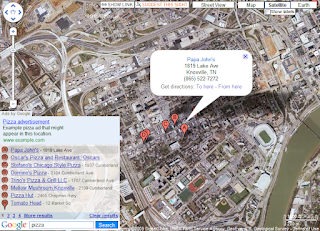
If you're a developer with an existing Google Maps API implementation and an AdSense account, take a few minutes to add it to your maps to see how it performs for you. Interested in embedding Google Maps on your site? Take a look at the new Google Maps site to learn about all your options!
As this trend evolves, maps are becoming the backdrop or canvas for many webpages. We've been hearing from the over 150,000 Google Maps developers eager to monetize this growing screen real estate, so we've worked to ensure that Google Maps embedded on external websites can be properly monetized. If you're a Maps developer, you now have two options for your embedded Google Maps API implementations to earn revenue using AdSense.
Maps Ad Unit - This new Google Maps API feature overlays AdSense ads on an embedded Google map on your site. The ads are targeted to the map's current view and update as the user moves around the map. For example, if the user is looking at Napa Valley, California, the text ads will likely display ads for wineries, hotels, and/or restaurants. As the user moves the map, ads continue to change by location and you'll generate revenue from every valid ad click.
To see an example of this, take a look at ZipMaps, an external Maps API site that presents U.S. zip code boundaries:

GoogleBar Local Search - The GoogleBar feature within the Google Maps API overlays a search box onto your map which lets the user perform a local search on the map. When results are shown, an ad is displayed that you earn revenue on when clicked. Feedback from sites that have implemented the GoogleBar reveals that users are happy to be able to search Google while on their map, and the site owners are happy to be able to monetize this additional service.
Here's an example of the GoogleBar in action on another Google Maps API site called Google Sightseeing:

If you're a developer with an existing Google Maps API implementation and an AdSense account, take a few minutes to add it to your maps to see how it performs for you. Interested in embedding Google Maps on your site? Take a look at the new Google Maps site to learn about all your options!
Tuesday, September 15, 2009
Introducing Google Web Elements
Looking for ways to spice up your website with dynamic content? You may know from our optimization tips that you can help increase your AdSense revenue by incorporating other Google products into your site. We're happy to introduce a new, easy way for you to do just that with Google Web Elements.
Web Elements let you easily add richness and interactivity to your site simply by copying and pasting a snippet of code. Inspired by the convenience of embeddable YouTube videos, each Web Element is built upon existing Google products. For example, the Google News element, introduced on this blog earlier this year, dynamically pulls in content from Google News based on news topics you select and displays within an embed on your site. With the official launch of Web Elements, you can choose to include Web Elements from products like Google Custom Search, Calendar, Docs, Friend Connect, and more.
Need more inspiration on how to integrate Web Elements into your site? Here are a few ideas:
Using a Web Element on your site (or two, or seven)? We'd love to hear what you think and how they've been working for you. Just leave a comment on this blog post!
Web Elements let you easily add richness and interactivity to your site simply by copying and pasting a snippet of code. Inspired by the convenience of embeddable YouTube videos, each Web Element is built upon existing Google products. For example, the Google News element, introduced on this blog earlier this year, dynamically pulls in content from Google News based on news topics you select and displays within an embed on your site. With the official launch of Web Elements, you can choose to include Web Elements from products like Google Custom Search, Calendar, Docs, Friend Connect, and more.
Need more inspiration on how to integrate Web Elements into your site? Here are a few ideas:
- If you're using a Custom Search Engine on your site, the Custom Search element can help you integrate search results much more seamlessly with the look and feel of your pages. You can continue to earn revenues from searches while offering a better user experience to your users with better results styling.
Who's using it: The Mayo Clinic uses the Custom Search Element as their main search function. The look and feel of the search results blends in smoothly with the rest of the site.
- To enable your visitors to post comments and links on your site, use the Conversation element. The element also lets visitors participate in conversations via Friend Connect.
Who's using it: St. Simons Blog uses the Conversation element to let users in St. Simons Island and Georgia's Golden Isles connect with each other.
- The YouTube News element displays the latest YouTube videos from a number of news content partners including the Associated Press, CBS Online, Washington Post, Bloomberg, NY Times, Russia Today, Al-Jazeera English, and more.
Who's using it: CitizenTube is YouTube's official news and politics blog. They display the YouTube News element on the right-hand side of the homepage labeled as "Latest News Videos".
- The Spreadsheet element allows you to display a table of information to your users which pulls from any Google Spreadsheet you choose. Whenever you update the Spreadsheet, the element will also update automatically. This is an easy way to keep dynamic content on your site fresh.
Who's using it: Metal Italia is an Italian heavy metal fan site. The site uses the Spreadsheet element to display album information for heavy metal artists.


Using a Web Element on your site (or two, or seven)? We'd love to hear what you think and how they've been working for you. Just leave a comment on this blog post!
Tuesday, July 14, 2009
Now offering AdSense in Google Sites
As an AdSense publisher, you manage and develop websites. Google Sites is a free product that simplifies the process of creating secure group websites, whether you're building a family website or a company intranet. You can publish pages with the click of a button, edit web pages like documents, and add videos, presentations, and calendars to your pages. Information is stored securely online, and you decide who can edit or view the site. And now, with a recent integration, you can place AdSense ads on Google Sites to earn money.

If you're new to Google Sites, we encourage you to take it for a test drive today. After you've built out your site and ensured that it complies with our program policies, follow these instructions to add AdSense to your pages. You'll have the option to place ads in the sidebar as well as the main content of each page, and you can choose the formats that work best for your site. If you're not sure where to start, we encourage you to check out our optimization tips to make sure you're maximizing your site's revenue.
For more information about getting started with Google Sites, watch this video:

If you're new to Google Sites, we encourage you to take it for a test drive today. After you've built out your site and ensured that it complies with our program policies, follow these instructions to add AdSense to your pages. You'll have the option to place ads in the sidebar as well as the main content of each page, and you can choose the formats that work best for your site. If you're not sure where to start, we encourage you to check out our optimization tips to make sure you're maximizing your site's revenue.
For more information about getting started with Google Sites, watch this video:
Thursday, June 18, 2009
Speeding up: the basics and Analytics
 Today, we're kicking off a five-week educational series about speeding up your business in a slowdown. We'll be revisiting the basics of online publishing to help you grow your business, and we'll share tips about using AdSense and other Google products that you can apply to your business now. In the coming Thursdays, you can look forward to tips for making your site more user-friendly, bringing in more visitors, increasing your revenue potential, and attracting more advertiser budget. Along the way, we invite you to share your own suggestions for growing your business by leaving comments at the end of each post. You can also follow the campaign at www.google.com/ads/speedingup.
In today's post, you'll hear from Avinash Kaushik, Google's own Analytics Evangelist, about the importance of understanding your traffic, analyzing how your site performs, and using data to make decisions. Here are a few small to mid-sized ideas that -- in Avinash's own words -- can add up to remarkable results for your website. They're all things you can do today with free web analytics tools, like Google Analytics.
Idea #1: Discover what content and traffic sources keep people coming to your site again and again.
How many times does a visitor have to visit your site to be considered valuable? Use the Visitor Loyalty report in the Visitors section of Google Analytics to pinpoint the visitors who come to your site that many times or more. Put that data into an advanced segment and apply that segment to your core reports to understand things like where these valuable visitors come from and what content they consume. You can then use this information to optimize how you acquire new visitors and the content on your site for loyal visitors.

Idea #2: Figure out which pages to improve on your site.
Many people ask the question: "How do I know which pages on my site to improve?" Take a look at the Top Landing Pages report in the Content section of Google Analytics. This report tells you the first page people see when they enter your site. Sort this report by bounce rate. Bounce rate measures how many people come to your site, only see one page and leave right away (or as Avinash calls it: "I came, I puked, I left"). Once you identify which of your top landing pages are not able to get a single click from your visitors you know which pages need to be improved.

Idea #3: Find out where AdSense performs best on your site.
If you've linked your AdSense and Analytics accounts, the Top AdSense Content report in the AdSense section of Google Analytics will tell you where on your website AdSense ads get the most clicks. This is a win-win for your business and your customers, as it helps you identify what type of content to produce more of based on what content people are most interested in as well as where people most often click on your AdSense ads.

If you haven't already, link your AdSense and Analytics accounts in order to take full advantage of what Analytics can offer. If you don't yet have an Analytics account, you can sign up today.
Additional Resources:
- Read more from Avinash at his blog, Occam's Razor, which has more tips like the above and additional ways to use Visitor Loyalty metrics, or on the Official Google Blog.
- To learn more about using Analytics on your website, visit Conversion University.
- See great ways to use AdSense and Analytics together by watching this video.
Friday, June 5, 2009
Top ten myths about Google Analytics
A few weeks back, we announced that all publishers can now integrate their AdSense accounts with Google Analytics. If you're not very familiar with Analytics yet, you might be interested in reading a recent post on the Analytics blog that addresses ten common myths about the product. For example, did you know that you can use Analytics to segment visitor data in real time, or that you can use the new Analytics API to tie your website data to your financials? Check out the post to learn more about these features and other ways you can use Analytics to better understand your site stats.
If you haven't yet linked your AdSense account with Analytics, follow these steps:
If you haven't yet linked your AdSense account with Analytics, follow these steps:
- Sign in to AdSense.
- Click the link that says "Integrate your AdSense account with Google Analytics" on your Reports Overview page.
- Follow the onscreen instructions, and watch our video for additional guidance.
Friday, May 29, 2009
You've got a Friend Connect gadget
Social networking features are all the rage these days. (AdSense has even joined the trend with Twitter!) Now your site can be part of the social web by using the features offered through Google Friend Connect to awaken and strengthen your community of visitors.
With Friend Connect, your visitors can join your site using credentials they've already created with Google, Yahoo, AOL, and others, and link in the people they know on services like Google Talk, Plaxo, Twitter, and more. There's also a gallery of gadgets where you can choose from features like commenting, ratings and reviews, and the social bar to add to your site. Just like AdSense, you can simply copy and paste a few snippets of code to add these features to your site. Or, if you want to do some deeper integrations, you can use the Friend Connect APIs.
Watch this video to learn more about Friend Connect:
We're constantly adding more social gadgets, such as the event gadget, the Polls gadget, and the Get Answers gadget. To learn more about Friend Connect and other Google products helping to make the web -- and your site -- more social, check out the Social Web Blog.
With Friend Connect, your visitors can join your site using credentials they've already created with Google, Yahoo, AOL, and others, and link in the people they know on services like Google Talk, Plaxo, Twitter, and more. There's also a gallery of gadgets where you can choose from features like commenting, ratings and reviews, and the social bar to add to your site. Just like AdSense, you can simply copy and paste a few snippets of code to add these features to your site. Or, if you want to do some deeper integrations, you can use the Friend Connect APIs.
Watch this video to learn more about Friend Connect:
We're constantly adding more social gadgets, such as the event gadget, the Polls gadget, and the Get Answers gadget. To learn more about Friend Connect and other Google products helping to make the web -- and your site -- more social, check out the Social Web Blog.
Tuesday, May 5, 2009
Showcase your site with Google Ad Planner's Publisher Center
To help you increase the visibility of your sites to potential advertisers, we've just launched the Publisher Center in Google Ad Planner. This will allow you to provide details about your sites to help attract advertisers. Though the Publisher Center is only available in English at this time, any publisher can use the tool.
As a quick reminder, Ad Planner is a media planning tool that helps agencies and advertisers find sites that cater to their target audiences. In the new Publisher Center within Ad Planner, you can claim sites you own and customize the descriptions for each. For each site, you can also add up to five categories that describe your site's content, and the types, sizes, and formats of ads that your site supports.

In addition, you can share your Google Analytics data with Ad Planner to provide advertisers with additional details about your site, such as the number of unique visitors and page views. By replacing Ad Planner traffic estimates with data measured directly by Google Analytics, you'll be able to provide advertisers with more accurate site traffic information.
Based on this information, agencies and advertisers using Ad Planner will be able to identify appropriate sites to include in their placement-targeted campaigns. As more advertisers become aware of your sites and bid to show ads on them, the competition among your ads will increase and so should your earnings potential.
We encourage you to visit the new Google Ad Planner Publisher Center to begin claiming sites you own. For more information about the Google Ad Planner Publisher Center, visit our Help Center, or watch our video below:
As a quick reminder, Ad Planner is a media planning tool that helps agencies and advertisers find sites that cater to their target audiences. In the new Publisher Center within Ad Planner, you can claim sites you own and customize the descriptions for each. For each site, you can also add up to five categories that describe your site's content, and the types, sizes, and formats of ads that your site supports.

In addition, you can share your Google Analytics data with Ad Planner to provide advertisers with additional details about your site, such as the number of unique visitors and page views. By replacing Ad Planner traffic estimates with data measured directly by Google Analytics, you'll be able to provide advertisers with more accurate site traffic information.
Based on this information, agencies and advertisers using Ad Planner will be able to identify appropriate sites to include in their placement-targeted campaigns. As more advertisers become aware of your sites and bid to show ads on them, the competition among your ads will increase and so should your earnings potential.
We encourage you to visit the new Google Ad Planner Publisher Center to begin claiming sites you own. For more information about the Google Ad Planner Publisher Center, visit our Help Center, or watch our video below:
Friday, April 3, 2009
Revenue opportunities for video content owners
Last week, we announced that the video units feature will soon be retired. Our announcement has created some confusion, so we thought it would be helpful to outline how Google will still continue to support revenue opportunities for video content owners.
The video units feature allowed publishers to create video unit players, with YouTube partner content and accompanying ads, within their AdSense accounts. They could then embed this special player into their web pages, and revenue generated from the ads would be split between the YouTube partner, the AdSense publisher, and Google. Although we're retiring the video units feature, we'll continue to offer the following monetization solutions to video content creators:
AdSense for video
AdSense for video gives video owners the ability to earn money from videos they create or own. They can run placement targeted instream video ads (pre, mid, post rolls) and graphical overlays or contextually targeted text ads in Flash players, and the ad revenue will be split between the video owner and Google.
Current AdSense for video publishers include Encyclopedia Britannica, Demand Media, and College Humor. If you'd like more information about the program or how to apply, visit our microsite.
YouTube Partner Program
Similarly, the YouTube Partner Program enables popular content creators to share in advertising revenue from their own videos hosted on YouTube. Participants can choose the videos on which they'd like to show overlay ads or accompanying banner ads. These videos earn them money whether they're viewed on YouTube or embedded onto web pages elsewhere online, and the revenue generated from these ads will be split between the YouTube partner and Google.
The YouTube Partner Program has thousands of participants from ten countries around the world, and is accepting applications. To learn more about the program, visit the Partnerships Benefits page.
The video units feature allowed publishers to create video unit players, with YouTube partner content and accompanying ads, within their AdSense accounts. They could then embed this special player into their web pages, and revenue generated from the ads would be split between the YouTube partner, the AdSense publisher, and Google. Although we're retiring the video units feature, we'll continue to offer the following monetization solutions to video content creators:
AdSense for video
AdSense for video gives video owners the ability to earn money from videos they create or own. They can run placement targeted instream video ads (pre, mid, post rolls) and graphical overlays or contextually targeted text ads in Flash players, and the ad revenue will be split between the video owner and Google.
Current AdSense for video publishers include Encyclopedia Britannica, Demand Media, and College Humor. If you'd like more information about the program or how to apply, visit our microsite.
YouTube Partner Program
Similarly, the YouTube Partner Program enables popular content creators to share in advertising revenue from their own videos hosted on YouTube. Participants can choose the videos on which they'd like to show overlay ads or accompanying banner ads. These videos earn them money whether they're viewed on YouTube or embedded onto web pages elsewhere online, and the revenue generated from these ads will be split between the YouTube partner and Google.
The YouTube Partner Program has thousands of participants from ten countries around the world, and is accepting applications. To learn more about the program, visit the Partnerships Benefits page.
Monday, March 9, 2009
Add Google News to your website
Do you run a site that relates to people or topics often covered in the media? Or are you looking for additional ways to engage your users? If so, we'd like to introduce you to our recently released Google News–based element for webmasters and developers. This element will allow you to easily integrate headlines and previews from Google News into any page to supplement your content and help make it more dynamic. Whether your site's visitors are interested in business, entertainment or fashion, you control the types of stories in your personal news show. You can input keywords like "Obama" or broad topics like "world news" or "politics".
Adding this element to your site or blog is easy using our NewsShow wizard. You can select the size of the frame, the topics, and the number of articles you want to show, and we'll build the code for you. Or, for more customization, take a look at our documentation.
For more information, see our post on the AJAX Search API Blog. To get started now, head straight to our wizard to cut and paste your own NewsShow.
Adding this element to your site or blog is easy using our NewsShow wizard. You can select the size of the frame, the topics, and the number of articles you want to show, and we'll build the code for you. Or, for more customization, take a look at our documentation.
For more information, see our post on the AJAX Search API Blog. To get started now, head straight to our wizard to cut and paste your own NewsShow.
Monday, December 22, 2008
Light up your site
We all know how it feels to find the perfect gift. After scouring stores far and wide, suddenly your hunt is over: the stars have aligned to bring you just what you're looking for -- and not a moment too soon. It's a bit the same way when a search brings you to just the right site. But what if your site's just the right site, and users can't find it?
We're happy to let you know that you don't need divine forces to play a role in the findability of your site. Nope -- you can help make sure that your site turns up just when it should by taking advantage of these tips from our Search Quality Team.
We're happy to let you know that you don't need divine forces to play a role in the findability of your site. Nope -- you can help make sure that your site turns up just when it should by taking advantage of these tips from our Search Quality Team.
- Not sure if all your pages are being seen by Google? Search for your site's address after the command "site", like [site:example.com]. When you see your pages in the results, check your snippet content and page titles. Include information that matches the topic of a particular page. If anything is missing or you want more details, you can also use the Content Analysis tool in Webmaster Tools.
- If you upload new pages or topics faster than Google crawls your site, make sure to submit a Google Sitemap and include a refresh rate.
- Label your images appropriately. Users searching in Google Image Search will more easily find the image on your site. Don't miss out on potential traffic because of [001.jpg] instead of [NintendoWii.jpg]. Image Search is one of the largest search properties out there, so you should take advantage of it.
- Manage your SiteLinks. Your most valuable links may not be the ones that Google chooses as SiteLinks, so remember you can remove any that you don't think users will find useful.
- Check for errors and keyword traffic in Webmaster Tools. See our diagnostics checklist.
- Serve accurate HTTP status codes. If you've retired a page permanently, serve a 404. If you've simply relocated it, serve a 301. The more we know about your old pages, the faster we will find the next best page on your site for a given query.
- Users and search engines like organic content. Make some of your own!
- Read our recently released SEO Starter Guide.
- Watch our Tutorials for Webmasters.
- Find out what information Google has about your website in Webmaster Tools.
- Get the latest updates from the Webmaster Central Blog.
- Find answers to your questions in our Webmaster Help Center, or ask your questions in the Webmaster Help Group.
Tuesday, December 16, 2008
Spotlight on your content
It's Google's mission to organize the world's information and make it readily available to all; as a web publisher, one of your goals may also be to make sure your content is readily available to all. We've recently taken steps to help you grow your site's traffic: we updated our Submit Your Content site with more information about distributing your content through Google products such as Web Search, Maps, YouTube, and iGoogle. In addition, we launched our Content Central blog, featuring tips and information from Googlers who work on different products. The goal of both of these resources is to help you grow your site's visitors by taking advantage of promotion opportunities in new Google mediums.
If you're just getting started with these resources, we recommend visiting the yellow getting started box in the upper right hand corner of the Submit Your Content homepage. Here, we've listed the three steps we recommend all content partners take to begin sharing their content. Alternatively, check out the industry categories where we'll walk you through the types of content you may have, and show you where that content is visible across various Google services.

We've also enabled comments on the Content Central blog, so feel free to visit the blog to suggest topics for future posts or leave your feedback. If you've already visited the Submit Your Content site, you may know all about the wonders of RSS, so be sure to subscribe to the Content Central blog's feed to receive the latest posts when they're published. Or, enter your email address in the right-hand sidebar to subscribe by email.
If you're just getting started with these resources, we recommend visiting the yellow getting started box in the upper right hand corner of the Submit Your Content homepage. Here, we've listed the three steps we recommend all content partners take to begin sharing their content. Alternatively, check out the industry categories where we'll walk you through the types of content you may have, and show you where that content is visible across various Google services.

We've also enabled comments on the Content Central blog, so feel free to visit the blog to suggest topics for future posts or leave your feedback. If you've already visited the Submit Your Content site, you may know all about the wonders of RSS, so be sure to subscribe to the Content Central blog's feed to receive the latest posts when they're published. Or, enter your email address in the right-hand sidebar to subscribe by email.
Thursday, November 13, 2008
Now serving overlay ads in embedded YouTube partner videos
Today, to help its video content partners earn more money, YouTube will begin running overlay ads in YouTube partner videos embedded on other websites. To date, YouTube has only run ads against partner videos on YouTube itself, and with people viewing millions of embedded YouTube videos every day, this meant that partners were not generating revenue from their views outside YouTube.com. But now, YouTube partners will be able to capitalize on their popularity across the internet and generate revenue from their content no matter where their video lives.
Although this may sound similar to AdSense video units, this YouTube change is separate from AdSense, and we'd like to discuss the differences between the two offerings.
Let's start with a refresher on AdSense video units, which are available within AdSense accounts in specific languages and regions. Video units help you enrich your website with fresh, dynamic content from our YouTube partners. Each video unit is accompanied by a banner ad and a overlay ad targeted towards the video and the site's content, and is customizable so you can choose categories of video to target to your site. The ad revenue is divided between the AdSense publisher, YouTube, and the YouTube partner providing the video content.
But AdSense video units aren't the only way our YouTube partners can distribute their content -- just as with other YouTube videos, it's possible for anyone with a website to embed partner videos on their sites. Now, following today's announcement, thousands of videos produced by YouTube partners will begin displaying overlay ads when embedded on other websites. (youtube will gradually roll out these ads to additional YouTube partner videos in the coming weeks.) This feature is external to AdSense, and so no configuration within an AdSense account is needed. Revenue from these ads will be divided between YouTube and the YouTube partner providing the video content.
By helping YouTube partners generate additional revenue no matter where their videos are played, we hope to encourage further content creation among our most popular and prolific video creators. If you create your own video content and are interested in becoming a YouTube partner, submit an application today.
Although this may sound similar to AdSense video units, this YouTube change is separate from AdSense, and we'd like to discuss the differences between the two offerings.
Let's start with a refresher on AdSense video units, which are available within AdSense accounts in specific languages and regions. Video units help you enrich your website with fresh, dynamic content from our YouTube partners. Each video unit is accompanied by a banner ad and a overlay ad targeted towards the video and the site's content, and is customizable so you can choose categories of video to target to your site. The ad revenue is divided between the AdSense publisher, YouTube, and the YouTube partner providing the video content.
But AdSense video units aren't the only way our YouTube partners can distribute their content -- just as with other YouTube videos, it's possible for anyone with a website to embed partner videos on their sites. Now, following today's announcement, thousands of videos produced by YouTube partners will begin displaying overlay ads when embedded on other websites. (youtube will gradually roll out these ads to additional YouTube partner videos in the coming weeks.) This feature is external to AdSense, and so no configuration within an AdSense account is needed. Revenue from these ads will be divided between YouTube and the YouTube partner providing the video content.
By helping YouTube partners generate additional revenue no matter where their videos are played, we hope to encourage further content creation among our most popular and prolific video creators. If you create your own video content and are interested in becoming a YouTube partner, submit an application today.
Friday, September 12, 2008
Quality, not quantity
 As we mentioned a few weeks ago, you can use your AdSense account to display ads on any policy-compliant sites you own. This has often sparked the question among new publishers of 'How many sites do I need to earn money with AdSense?'
We'd like to stress that it's not the number of sites you have, but the quality of those sites that will help you increase your earnings with AdSense. If you're just getting started with your first website and the AdSense program, we recommend taking the time to build up your site with plenty of original, quality content -- write about topics you're passionate about, or which you have expertise in. When designing your website, keep our Webmaster Guidelines and, most importantly, your users in mind.
Then, take advantage of our Webmaster Tools to help increase your site's visibility in the Google search index, and try out the tips our Search Quality Evaluators have provided. Once you've built up organic traffic to your site, use Website Optimizer to understand how users interact with your pages and make improvements to your layout. And of course, during all of this, experiment with AdSense optimization tips to learn which colors, formats, and placements monetize best on your site.
Finally, as we blogged about during this Newbie Fridays series, your earnings potential can go up as advertisers find that you're sending high-quality leads to their sites. This won't happen overnight, but with patience and hard work you can watch your efforts convert into a high-quality site and higher AdSense earnings. And you won't even need a hundred sites to do it :)
Tuesday, September 2, 2008
Announcing Google Chrome
 Today, we're happy to announce the release of the beta version of a new open-source browser: Google Chrome. We encourage you to download it and give it a try.
Google Chrome features a simple and intuitive user interface and an entirely new architecture designed for speed, security, and stability. You can find out more about other Google Chrome features here.
For publishers, you should see the ads on your pages continue to appear as normal in Google Chrome; we built Google Chrome so that most webmasters and site owners shouldn't have to make changes to their sites. If your site is compatible with Safari, it should also be compatible with Google Chrome, as they are both built using WebKit. If you have any questions regarding compatibility with your site, feel free to refer to our webmaster site.
To learn more about why we built Google Chrome, see our official Google blog.
Thursday, August 7, 2008
On your frequency
In the coming months, we'll be rolling out some new foundational features in AdWords for the content network. These features are intended to enhance your earning potential and the effectiveness of ads we serve to users on your sites. Some of the benefits of these features include:
We're excited about these upcoming features that will improve the experience for users and protect privacy while creating more value for our publishers and advertisers.
- Frequency capping, which prevents users from repeatedly seeing the same ads on your pages.
- Improved attribution, to help advertisers identify the best performing sites in the network based on post-impression activity.
- Improved ads quality, as we're able to improve ad performance within the Google content network.
We're excited about these upcoming features that will improve the experience for users and protect privacy while creating more value for our publishers and advertisers.
Monday, July 21, 2008
A peek into recent AdWords developments
If you're an avid Inside AdSense reader, you know that we frequently post about the latest developments in AdSense and new features you can take advantage of. However, we've heard from some publishers that they want to know more about what's happening in AdWords, and what we're doing to bring more relevant, targeted ads to AdSense sites like yours. With that, we'd like to take a moment to give you insight into a few recent AdWords developments, and what they mean for you as an AdSense publisher.
One of the main changes is the ability for advertisers to be more specific with their ad targeting through a combination of contextual targeting and placement targeting. As you may know, contextually targeted ads will appear on your pages if an advertiser's keywords match your content, while placement-targeted ads will appear if an advertiser has specifically selected your ad placement or site. Now, advertisers can target your site or placements, but can also specify keywords for them so that their ads only appear in the most relevant pages. These ads will still need to compete with the available inventory of ads for a particular placement, and so only the highest-paying, most relevant ads will appear on your pages. At the same time, you'll still be able to use your Competitive Ad Filter to prevent ads from specific URLs from appearing.
What does this mean for you, as an AdSense publisher? Your users may see more relevant ads on your pages, and advertisers who become more confident that their ads are reaching the right audience may increase their ad spend -- both of these can result in higher monetization for you. In addition, while advertisers previously could only change their bids for all ads running across multiple sites, they can now adjust their bids for individual sites. This means that advertisers can spend more of their budgets on the specific AdSense sites which perform well and generate high-quality leads for the advertiser.
With these recent improvements, we're looking forward to expanding the number of advertisers who use the AdSense content network and increasing the relevance of their ads on your sites. Not only will this increase your earnings potential through the AdSense program, but it will also strengthen the ads ecosystem that benefits publishers, advertisers, and users.
One of the main changes is the ability for advertisers to be more specific with their ad targeting through a combination of contextual targeting and placement targeting. As you may know, contextually targeted ads will appear on your pages if an advertiser's keywords match your content, while placement-targeted ads will appear if an advertiser has specifically selected your ad placement or site. Now, advertisers can target your site or placements, but can also specify keywords for them so that their ads only appear in the most relevant pages. These ads will still need to compete with the available inventory of ads for a particular placement, and so only the highest-paying, most relevant ads will appear on your pages. At the same time, you'll still be able to use your Competitive Ad Filter to prevent ads from specific URLs from appearing.
What does this mean for you, as an AdSense publisher? Your users may see more relevant ads on your pages, and advertisers who become more confident that their ads are reaching the right audience may increase their ad spend -- both of these can result in higher monetization for you. In addition, while advertisers previously could only change their bids for all ads running across multiple sites, they can now adjust their bids for individual sites. This means that advertisers can spend more of their budgets on the specific AdSense sites which perform well and generate high-quality leads for the advertiser.
With these recent improvements, we're looking forward to expanding the number of advertisers who use the AdSense content network and increasing the relevance of their ads on your sites. Not only will this increase your earnings potential through the AdSense program, but it will also strengthen the ads ecosystem that benefits publishers, advertisers, and users.
Subscribe to:
Comments (Atom)