If you're a publisher located in Cyprus, Luxembourg, Malta, Monaco, San Marino, Slovenia, or Vatican City, you can now switch to local currency reports to view your earnings in Euros. Once you make this change, any earnings generated from advertisers paying on other currencies will be converted to Euros each day. This also means that if you're receiving payments in Euros, there won't be any additional conversions at the end of the month when payments are issued.
Before you switch to local currency reports, we suggest you download and save copies of your past reports in U.S. dollars for your records. Once you've done that, look for the green prompt in the upper right hand corner of your Reports Overview page. Click the link in the prompt, and you'll be asked to agree to a new set of Terms and Conditions. If you have questions or need legal advice on interpreting the new Terms, please don't hesitate to contact your attorney.
We encourage you to switch to local currency reports soon, since we'll be requiring this update in the future. You can learn more about these new reports in our Help Center, and we also recommend reviewing answers to a few FAQs we covered on the blog before.
Showing posts with label Earnings/Reports. Show all posts
Showing posts with label Earnings/Reports. Show all posts
Thursday, August 27, 2009
Tuesday, July 21, 2009
Expanding availability of local currency reports
We've been working to enable local currency reporting in more countries, and are happy to announce that this feature is now available for publishers located in Denmark and Norway. As a reminder, switching to these new reports means that all earnings generated from advertisers paying in other currencies will be converted to your local currency each day. If you receive payments in your local currency, there won't be any additional conversions at the end of the month, but you can still update your payment method and currency at any time.
If you're located in one of these countries, we recommend that you first download and save copies of your past reports in U.S. dollars for your records. Once you're ready to switch to local currency reports, sign in to your account and look for the green prompt in the upper right hand corner of your Reports Overview page. Click on the link, and you'll then be asked to agree to a new set of Terms and Conditions. If you have questions or need legal advice on interpreting the new Terms, please don't hesitate to contact your attorney.
We encourage you to switch to local currency reports soon, as we'll be requiring this change in the future. To learn more about these new reports, visit our Help Center or review common FAQs in a recent Inside AdSense blog post -- all references to 'Euros' in the post now also apply to your local currency.
Updated for accuracy
If you're located in one of these countries, we recommend that you first download and save copies of your past reports in U.S. dollars for your records. Once you're ready to switch to local currency reports, sign in to your account and look for the green prompt in the upper right hand corner of your Reports Overview page. Click on the link, and you'll then be asked to agree to a new set of Terms and Conditions. If you have questions or need legal advice on interpreting the new Terms, please don't hesitate to contact your attorney.
We encourage you to switch to local currency reports soon, as we'll be requiring this change in the future. To learn more about these new reports, visit our Help Center or review common FAQs in a recent Inside AdSense blog post -- all references to 'Euros' in the post now also apply to your local currency.
Updated for accuracy
Monday, June 15, 2009
Local currency reports for nine more countries
Following our launch of Euro reporting for publishers in five European countries, we're happy to announce that local currency reports are now also available in Australia, Austria, Belgium, Finland, Greece, Portugal, South Africa, Switzerland, and the UK.
If you're located in one of these countries, you can now update your account to display earnings in your local currency. After you've updated your account, any earnings generated from advertisers paying in currencies other than your local currency will be converted daily. If you receive payments in your local currency, this means that there also won't be any additional conversions at the end of the month. However, you can still choose to receive payments in U.S. Dollars or change your payment method at any time.
Before enabling local currency reports in your account, we recommend downloading and saving copies of your past reports in U.S. Dollars for your records. You can then update your account by signing in to AdSense and clicking the link in the green prompt on your Reports Overview page. You'll be asked to review and agree to a new set of Terms and Conditions. Unfortunately, we're not able to interpret the meaning of changes in our legal documents for publishers -- if you have questions or need legal advice on interpreting the new Terms, please don't hesitate to contact your attorney.
We'll be requiring this change in the future, so we recommend updating your account to report earnings in your local currency soon. You can find answers to common FAQs associated with these new local currency reports in a recent Inside AdSense blog post -- all references to 'Euros' in the post now also apply to your local currency. In addition, detailed information about these new reports can be found in our Help Center.
If you're located in one of these countries, you can now update your account to display earnings in your local currency. After you've updated your account, any earnings generated from advertisers paying in currencies other than your local currency will be converted daily. If you receive payments in your local currency, this means that there also won't be any additional conversions at the end of the month. However, you can still choose to receive payments in U.S. Dollars or change your payment method at any time.
Before enabling local currency reports in your account, we recommend downloading and saving copies of your past reports in U.S. Dollars for your records. You can then update your account by signing in to AdSense and clicking the link in the green prompt on your Reports Overview page. You'll be asked to review and agree to a new set of Terms and Conditions. Unfortunately, we're not able to interpret the meaning of changes in our legal documents for publishers -- if you have questions or need legal advice on interpreting the new Terms, please don't hesitate to contact your attorney.
We'll be requiring this change in the future, so we recommend updating your account to report earnings in your local currency soon. You can find answers to common FAQs associated with these new local currency reports in a recent Inside AdSense blog post -- all references to 'Euros' in the post now also apply to your local currency. In addition, detailed information about these new reports can be found in our Help Center.
Friday, June 5, 2009
Top ten myths about Google Analytics
A few weeks back, we announced that all publishers can now integrate their AdSense accounts with Google Analytics. If you're not very familiar with Analytics yet, you might be interested in reading a recent post on the Analytics blog that addresses ten common myths about the product. For example, did you know that you can use Analytics to segment visitor data in real time, or that you can use the new Analytics API to tie your website data to your financials? Check out the post to learn more about these features and other ways you can use Analytics to better understand your site stats.
If you haven't yet linked your AdSense account with Analytics, follow these steps:
If you haven't yet linked your AdSense account with Analytics, follow these steps:
- Sign in to AdSense.
- Click the link that says "Integrate your AdSense account with Google Analytics" on your Reports Overview page.
- Follow the onscreen instructions, and watch our video for additional guidance.
Thursday, May 21, 2009
Euro reporting and you: your questions answered
Since introducing reports in Euros for publishers located in France, Germany, Italy, the Netherlands, and Spain, we've received a number of questions about this launch. For publishers in these regions, we've addressed some of your concerns below.
How will my earnings be converted to Euros?
Once you switch to the new reports, earnings generated from advertisers paying in currencies other than the Euro will be converted. This will happen on a daily basis using the prevailing market rate from the previous day. If you generate earnings from an advertiser paying in Euros, they won't be converted.
When I'm issued a payment, will my earnings be converted again?
If you've switched to Euro reports and are receiving payments in Euros, there will be no additional conversions when your payments are issued. However, if you're receiving payments in U.S. Dollars, your payment will be converted from Euros to U.S. Dollars at the end of the month.
When I switch to Euro reports, will that automatically change the currency of my payments?
No, your selected payment currency and method won't change after you switch to Euro reports -- unless, of course, you want them to change. (You can update them by visiting the 'Payments Details' section under your My Account tab.)
Will there be a delay in receiving my unpaid earnings once I make this change?
No, making this change will not affect the timing of your payments. After you switch to Euro reports, your unpaid earnings in U.S. Dollars will be converted to Euros before the next upcoming payment selection deadline (typically the 15th of each month). For instance, if you make this switch on June 3rd, your unpaid earnings will be converted by June 15th; if you make this switch on June 20th, your unpaid earnings will be converted by July 15th.
How will this change influence VAT and any taxes I have to pay?
While you may receive your payments in your local currency, all payments are being made by Google Ireland, a company incorporated under the laws of Ireland, in accordance with the terms of your agreement with Google. Unless your business is in Ireland, you shouldn't have an obligation to charge Google VAT or treat any of our payments to you as VAT that needs to be paid to any VAT authorities. If your billing address is located in Ireland, you may have an obligation to charge Google Irish VAT. For more specific answers, we suggest you head for your local tax adviser.
I'm not located in France, Germany, Italy, the Netherlands, or Spain. When will you include other countries?
We're working to offer Euro reports to publishers located in additional countries. When we do, we'll be sure to post any updates here on Inside AdSense.
Do I need to update my account if I'm eligible?
Although this change is currently optional, in the future we will require that publishers located in eligible countries make this switch. Eligible publishers who haven't yet updated their accounts will currently see an interstitial page with additional information after signing in. We understand that some eligible publishers would like to continue receiving payments in U.S. Dollars; while you can still choose to be paid in U.S. Dollars, it will be mandatory to view your reports in Euros.
If you're eligible to make the switch to Euro reporting, we encourage you to review the updated Terms and Conditions and update your account soon. To get started, sign in to your account and look for the prompt, "See your daily earnings reported in Euro amounts!" on your Reports Overview page. You can also find more information in our Help Center.
How will my earnings be converted to Euros?
Once you switch to the new reports, earnings generated from advertisers paying in currencies other than the Euro will be converted. This will happen on a daily basis using the prevailing market rate from the previous day. If you generate earnings from an advertiser paying in Euros, they won't be converted.
When I'm issued a payment, will my earnings be converted again?
If you've switched to Euro reports and are receiving payments in Euros, there will be no additional conversions when your payments are issued. However, if you're receiving payments in U.S. Dollars, your payment will be converted from Euros to U.S. Dollars at the end of the month.
When I switch to Euro reports, will that automatically change the currency of my payments?
No, your selected payment currency and method won't change after you switch to Euro reports -- unless, of course, you want them to change. (You can update them by visiting the 'Payments Details' section under your My Account tab.)
Will there be a delay in receiving my unpaid earnings once I make this change?
No, making this change will not affect the timing of your payments. After you switch to Euro reports, your unpaid earnings in U.S. Dollars will be converted to Euros before the next upcoming payment selection deadline (typically the 15th of each month). For instance, if you make this switch on June 3rd, your unpaid earnings will be converted by June 15th; if you make this switch on June 20th, your unpaid earnings will be converted by July 15th.
How will this change influence VAT and any taxes I have to pay?
While you may receive your payments in your local currency, all payments are being made by Google Ireland, a company incorporated under the laws of Ireland, in accordance with the terms of your agreement with Google. Unless your business is in Ireland, you shouldn't have an obligation to charge Google VAT or treat any of our payments to you as VAT that needs to be paid to any VAT authorities. If your billing address is located in Ireland, you may have an obligation to charge Google Irish VAT. For more specific answers, we suggest you head for your local tax adviser.
I'm not located in France, Germany, Italy, the Netherlands, or Spain. When will you include other countries?
We're working to offer Euro reports to publishers located in additional countries. When we do, we'll be sure to post any updates here on Inside AdSense.
Do I need to update my account if I'm eligible?
Although this change is currently optional, in the future we will require that publishers located in eligible countries make this switch. Eligible publishers who haven't yet updated their accounts will currently see an interstitial page with additional information after signing in. We understand that some eligible publishers would like to continue receiving payments in U.S. Dollars; while you can still choose to be paid in U.S. Dollars, it will be mandatory to view your reports in Euros.
If you're eligible to make the switch to Euro reporting, we encourage you to review the updated Terms and Conditions and update your account soon. To get started, sign in to your account and look for the prompt, "See your daily earnings reported in Euro amounts!" on your Reports Overview page. You can also find more information in our Help Center.
Wednesday, April 29, 2009
Analytics integration for all
Over the past few months, we've been gradually inviting publishers to integrate their AdSense accounts with Google Analytics, and today we're happy to announce that this feature is now available to all publishers. Integrating your account with Analytics will provide you with more detailed information about traffic to your pages and how users interact with your site.
Once you link your accounts, you'll find an AdSense-specific menu under the 'Content' section of the left-hand navigation bar on your Analytics homepage, containing these reports:

You'll also notice that other sections of your Analytics account will show a new 'AdSense Revenue' tab. You'll be able to compare how much of your AdSense revenue is coming from new visitors versus existing ones, and view revenue based on user language.
To take advantage of these new reports, sign in to AdSense and click the 'Integrate your AdSense account with Google Analytics' link on your Reports Overview page. You'll be taken to a step-by-step wizard that will guide you through the rest of the process. If you use AdSense in a language that's not supported by Analytics, you can still link your accounts and view your Analytics reports in a different language.
We also recommend watching the video below, which will help explain the linking process:
Enjoy your new data, and don't forget to visit our Help Center if you have other questions about linking your accounts or reviewing your reports.
Once you link your accounts, you'll find an AdSense-specific menu under the 'Content' section of the left-hand navigation bar on your Analytics homepage, containing these reports:
- The Top AdSense Content report allows you to see more details about specific pages on your site and analyze ad performance. For instance, if you find that some of your pages generate a high number of pageviews but aren't monetizing as well as other pages, you can focus your optimization efforts on improving these pages.
- The Top AdSense Referrers report can help you see how different incoming traffic sources contribute to your revenue.
- Last, the AdSense Trending report lets you analyze how your site generates revenue during different times of the day and different days of the week.

You'll also notice that other sections of your Analytics account will show a new 'AdSense Revenue' tab. You'll be able to compare how much of your AdSense revenue is coming from new visitors versus existing ones, and view revenue based on user language.
To take advantage of these new reports, sign in to AdSense and click the 'Integrate your AdSense account with Google Analytics' link on your Reports Overview page. You'll be taken to a step-by-step wizard that will guide you through the rest of the process. If you use AdSense in a language that's not supported by Analytics, you can still link your accounts and view your Analytics reports in a different language.
We also recommend watching the video below, which will help explain the linking process:
Enjoy your new data, and don't forget to visit our Help Center if you have other questions about linking your accounts or reviewing your reports.
Tuesday, March 3, 2009
Reports have gone international
One of the requests we frequently hear from our international publishers is to view reports in currencies other than U.S. Dollars. That's why we're happy to announce that publishers located in France, Germany, Italy, the Netherlands, and Spain can now view AdSense reports in Euros.
If you're located in one of these five countries and make this update, we'll convert your earnings to Euros on a daily basis using the prevailing market rate from the previous day. With earnings converted daily, you'll avoid the risk of currency exchange fluctuations between USD and the Euro. You can still choose to receive payments in either Euros or U.S. Dollars and select from a range of payment methods as well.
To make the switch to local currency reports, you'll need to agree to a new set of Terms and Conditions. Here are the main changes involved:

Before agreeing to the new Terms, we also recommend that you download and save copies of your past reports in U.S. Dollars for your records. Once you update your account, you'll be able to view current and historical reports only in Euros. However, you'll still be able to view your prior payment history of U.S. Dollar earnings.
We encourage you to update your account to local currency reports soon, as we may require this change in the future. If we're able to offer this to publishers in other countries, we'll provide details here on Inside AdSense. For more information, please feel free to visit our Help Center.
If you're located in one of these five countries and make this update, we'll convert your earnings to Euros on a daily basis using the prevailing market rate from the previous day. With earnings converted daily, you'll avoid the risk of currency exchange fluctuations between USD and the Euro. You can still choose to receive payments in either Euros or U.S. Dollars and select from a range of payment methods as well.
To make the switch to local currency reports, you'll need to agree to a new set of Terms and Conditions. Here are the main changes involved:
- The party that publishers are contracting with changes from Google Inc. to Google Ireland Limited.
- Publishers are responsible for paying any local taxes in their jurisdiction. Google will only issue VAT refunds to publishers with an address in Ireland.
- The governing law changes from California law to either English or local law.

Before agreeing to the new Terms, we also recommend that you download and save copies of your past reports in U.S. Dollars for your records. Once you update your account, you'll be able to view current and historical reports only in Euros. However, you'll still be able to view your prior payment history of U.S. Dollar earnings.
We encourage you to update your account to local currency reports soon, as we may require this change in the future. If we're able to offer this to publishers in other countries, we'll provide details here on Inside AdSense. For more information, please feel free to visit our Help Center.
Sunday, February 15, 2009
Reports being updated
Yesterday, we experienced an issue which caused AdSense and Google Ad Manager reports to be delayed through the day. The issue began at 4am PST and lasted several hours, but has now been resolved. No stats from yesterday were lost, and our engineers have been working to restore your reports with the clicks, impressions, and earnings accrued from your sites. Most publisher reports have now been updated with yesterday's data, with a few accounts still catching up.
Thanks for your continued patience, and we apologize for the alarm and inconvenience caused by this reporting delay.
Thanks for your continued patience, and we apologize for the alarm and inconvenience caused by this reporting delay.
Thursday, December 4, 2008
Make your ad cents (and dollars) count
Back in May, we had tremendous interest from readers who asked if they could donate their earnings to help victims in China and Myanmar (Burma). We heard you loud and clear, and so we're happy to announce that during the next week, you can donate a portion or all of your entire unpaid balance as of November 30, 2008 to reconstruction efforts in these regions. The earth may no longer be quaking and the waters may now be calm, but help is still needed in these areas. Whether you have a balance of $0.10 or $100 in your account, we invite you to participate within the next week. Just think if everyone donated a dollar, what a difference that would make.
As you may expect, there are certain restrictions to donating, and all our normal policies still apply -- so please don't ask others to click on your ads in order to increase your earnings. For more information on how to participate, visit our donation form.
Finally, we know that you may be interested in donating your earnings to additional charities and causes. Please stay tuned to our blog for future opportunities to donate in other ways.
As you may expect, there are certain restrictions to donating, and all our normal policies still apply -- so please don't ask others to click on your ads in order to increase your earnings. For more information on how to participate, visit our donation form.
Finally, we know that you may be interested in donating your earnings to additional charities and causes. Please stay tuned to our blog for future opportunities to donate in other ways.
Wednesday, October 22, 2008
Make a date with data in Google Analytics
Here in AdSense, we’re big on data. From spreadsheets and graphs to weekly reports and metrics, we constantly turn to numbers when running our business. In a similar vein, we've heard your requests for more data to help you run your AdSense websites, which is why we’re excited to announce the integration of one of our personal favorite reporting tools, Google Analytics, with AdSense. We're gradually rolling out this functionality to publishers, and you'll see an invitation link at the top of your 'Overview' and 'Advanced Reports' pages when it's been enabled for your account.

By integrating your AdSense account with a new or existing Analytics account, you’ll have access to in-depth reports about user activity on your site. In addition to the wealth of metrics already available in Analytics such as unique visitors and visitor language, you'll now have access to granular reports that break down AdSense performance both by page and by referring site. Armed with this new data about user behavior, you’ll be able to make more informed decisions on how to improve the user experience on your site and optimize your AdSense units to increase your revenue potential.

We've highlighted a few ways to use the integrated metrics below, but we encourage you to be creative! Come up with your own to discover how useful (and fun) new data can be:

By integrating your AdSense account with a new or existing Analytics account, you’ll have access to in-depth reports about user activity on your site. In addition to the wealth of metrics already available in Analytics such as unique visitors and visitor language, you'll now have access to granular reports that break down AdSense performance both by page and by referring site. Armed with this new data about user behavior, you’ll be able to make more informed decisions on how to improve the user experience on your site and optimize your AdSense units to increase your revenue potential.

We've highlighted a few ways to use the integrated metrics below, but we encourage you to be creative! Come up with your own to discover how useful (and fun) new data can be:
- Discover untapped markets. Use the geographies report to determine which regions are under-represented in your site’s user base. Optimize your site’s content to attract more of these under-represented users.
- Drive high-earning traffic to your site. Use the 'Referring sites' report to determine where the users who are making you the most money are coming from. Focus your efforts on getting traffic from these sources.
- Delve deeper into AdSense reports. Use the visualization feature to look at trends in your site's AdSense performance over time, or by time of day.
Tuesday, October 14, 2008
The case of the delayed data
Do you frequently log in to your account to check your stats? We've heard from some publishers that they check their accounts every hour, or even multiple times an hour, and we're definitely happy to see your enthusiasm for the program! (For all of our blog veterans reading this post, you might recognize these as the symptoms of G.A.S.S..)
On that note, many publishers have asked us why they don't see any changes in their stats each time they log in, or why they sometimes see a 'No data available' message in their reports. This is because your reports are generally updated every 15 to 30 minutes, but there can sometimes be a delay of up to 24 hours. In addition, it can take up to 24 hours to fully verify our internal logs and finalize your reports -- as a result, you may sometimes see changes in your earnings during the course of the day. Please also keep in mind that your reports won't show data for impressions on public service announcements (PSAs).
How often do you check your account? Let us know in our comments field below :)
On that note, many publishers have asked us why they don't see any changes in their stats each time they log in, or why they sometimes see a 'No data available' message in their reports. This is because your reports are generally updated every 15 to 30 minutes, but there can sometimes be a delay of up to 24 hours. In addition, it can take up to 24 hours to fully verify our internal logs and finalize your reports -- as a result, you may sometimes see changes in your earnings during the course of the day. Please also keep in mind that your reports won't show data for impressions on public service announcements (PSAs).
How often do you check your account? Let us know in our comments field below :)
Friday, August 15, 2008
Seeing clicks but no revenue?
 Have you ever checked your reports and noticed that you have clicks reported, but no revenue? We'd like to explain why this may happen, as we frequently receive emails and questions on our Help Forum about this issue. What you're seeing may be due to one of the following:
- Allowed Sites setup
The Allowed Sites feature allows you to specify a list of sites where ads from your account may be displayed. If you're using this feature, you'll need to make sure that you've listed all sites where you'd like to display your AdSense ad code.
To check if this is the case, log into your account and visit the 'Allowed Sites' page under your AdSense Setup tab. If the radio button 'Allow any site to show ads for my account ' is populated, you're not being affected by this issue, and you should continue to #2 below. However, if 'Only allow certain sites to show ads for my account' is populated, review the list of sites in the box below -- are all the sites you own listed in this box? If the answer is 'no', you won't be credited for clicks on the missing sites. Please be sure to add all of the sites where you'd like to display your AdSense ad code.
We've noticed some confusion among publishers who have entered the sites of advertisers they'd like to see on their pages into the Allowed Sites list. Please know that this is not the case, as it's not possible to request ads for a particular page - the sites you enter into this box can only be sites where your ads can be placed. - Invalid clicks
It's possible that you have some clicks that our monitoring system has considered to be invalid. As we've mentioned before, we monitor all clicks and impressions on Google ads for any activity that may artificially drive up an advertiser's costs or a publisher's earnings. Any clicks that our system considers invalid will still appear on your 'Overview' page, under the Reports tab. However, because our advertisers aren't charged for these clicks and impressions, we won't show the earnings for this activity. If you're concerned about suspicious activity in your account, we recommend reviewing your site's logs and letting us know about the situation.
Rest assured that AdSense accounts are properly credited for all clicks and impressions we consider to be valid. We'll post your finalized earnings for a given month on your 'Payment History' page during the first week of the following month. For more information about invalid clicks, please review our Help Center.
Tuesday, April 15, 2008
The report of these link units is not exaggerated
I don't know about you, but I'm a big fan of data. I look at my own reports frequently and use channels to track the performance of individual pages and ad units so I can optimize my AdSense experience.
I'm also a fan of AdSense for content link units. As we've mentioned before, these units pack a big punch while conserving your screen real estate and can be a great addition to a page that's already using one of our many other products. We've also been doing a lot of work lately to improve the targeting of link units.
This is why I'm happy to announce that my two loves are now coming together. As of today, we've enhanced your reports so that you can view the performance of link units separately from your other AdSense for content units. Even better, the link unit-specific reports contain more information about your link units. A lot of publishers have been asking us for more statistics on their link units, such as the per-link CTR and the number of click-throughs to the link units results page.
To view your new, improved reports, visit the Advanced Reports page under your Reports tab and select AdSense for content. You'll notice a new option to customize your reports -- 'Choose Units'. A 'Combined' report will look just like the data you're used to seeing in your AdSense for content reports, while choosing 'Ad Units' or 'Link Units' will help you look at things with more granularity.
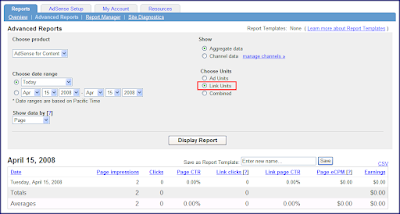
Please note that data is only available dating back to May 2007. Right now, we're having a little issue where, if you generate a report with a date range starting any earlier than May 2007, our report won't show any data, even if there is data after May 2007. Rest assured that our engineers are aware of the issue and are working to display all available data even if the date range starts before May 2007.
Remember, you're allowed to put up to three link units on any given page in addition to your three regular ad units. With better reporting and improved performance, now is the perfect time to start using link units if you aren't already.
I'm also a fan of AdSense for content link units. As we've mentioned before, these units pack a big punch while conserving your screen real estate and can be a great addition to a page that's already using one of our many other products. We've also been doing a lot of work lately to improve the targeting of link units.
This is why I'm happy to announce that my two loves are now coming together. As of today, we've enhanced your reports so that you can view the performance of link units separately from your other AdSense for content units. Even better, the link unit-specific reports contain more information about your link units. A lot of publishers have been asking us for more statistics on their link units, such as the per-link CTR and the number of click-throughs to the link units results page.
To view your new, improved reports, visit the Advanced Reports page under your Reports tab and select AdSense for content. You'll notice a new option to customize your reports -- 'Choose Units'. A 'Combined' report will look just like the data you're used to seeing in your AdSense for content reports, while choosing 'Ad Units' or 'Link Units' will help you look at things with more granularity.

Please note that data is only available dating back to May 2007. Right now, we're having a little issue where, if you generate a report with a date range starting any earlier than May 2007, our report won't show any data, even if there is data after May 2007. Rest assured that our engineers are aware of the issue and are working to display all available data even if the date range starts before May 2007.
Remember, you're allowed to put up to three link units on any given page in addition to your three regular ad units. With better reporting and improved performance, now is the perfect time to start using link units if you aren't already.
Friday, March 7, 2008
Diagnosing and treating revenue fluctuations (Part II)
Welcome back to the second part of our series designed to help you better understand revenue fluctuations. If you're just joining us now, or if you'd just like to brush up on those reporting terms before we dive in again, feel free to visit our previous post from earlier in the week.
Choose the right treatment
You're finished investigating the cause of the revenue fluctuations, and it's time to take action. Find the symptom you identified below for suggested treatments.
Page impression changes
Where are the changes happening?
Many AdSense publishers run multiple websites or have site sections that perform very differently. For example, the article section of a cell phone review site may have a higher eCPM than the forums. Whenever you notice revenue changes at the account level, always determine which of your sites or sections is causing the change. You can set up URL and custom channels to track all the important parts of your account separately. Knowing exactly what is changing and where will allow you to make the smartest decisions about what to do.
Taking seasonal fluctuation into account
Take a broader view and look for historical fluctuations in the metrics described above. Over the same time period last month or last year, you may find similar volatility in your eCPM, revenue, or page impressions. For example, you can compare the Mother's Day performance of a flowers and gifts site for 2006 and 2007. Is your current account performance consistent with the previous time range? If so, the revenue change you're investigating might reflect a recurring pattern.
I hope this series will help you get the most out of AdSense, and the next time your revenue changes, I hope it's for the positive.
Choose the right treatment
You're finished investigating the cause of the revenue fluctuations, and it's time to take action. Find the symptom you identified below for suggested treatments.
Page impression changes
- Check for AdSense technical issues or public service ads (PSAs). If ads aren't being served on your site, we aren't registering page impressions.
- Don't miss out on search traffic. Use Webmaster Tools to make sure that Google is properly crawling and indexing your site.
- Consider the promotions you have running for your site. Did an ad campaign end, causing a drop in traffic? Has a popular site linked to you, causing a spike in page impressions?
- A drop in CTR can be caused by a user interface (UI) that's not optimized or by poor targeting. Readers won't click on ads they don't see or find irrelevant. To improve the relevance of your ads, you might want to try section targeting.
- Check for crawl problems. If our system can't crawl your page, we can't serve relevant ads.
- If you've implemented or changed your ad server, check that there are no new targeting problems.
- Have you changed the look and feel of your site? Follow our optimization best practices whenever launching a site redesign. An easy way to start is to match the ad colors to the design of your site and choose a top performing unit such as the 300x250 medium rectangle.
- If your CTR has been in a slow decline, your readers may be experiencing ad blindness. Try testing new ad formats, placements, or colors.
- CPCs are determined by advertiser bids and are not directly under publisher control. Most large CPC changes are seasonal. For example, certain ad verticals attract more spending during the holiday or back-to-school seasons.
- CPCs can also fluctuate as advertisers begin and end their advertising campaigns.
- You can always improve your CPCs by choosing ad formats that support all ad types: text, image, video, flash, and gadget ads. More competition means higher advertiser bids.
- If overall targeted revenue is changing, determine what your average placement-targeted revenue has been for the past few months. Your goal is to determine if the changes in your recent earnings are part of a trend or a short-term earnings fluctuation.

- Publishers can experience spikes in placement-targeted revenue when advertisers run limited-time campaigns. For example, an advertiser may run a large placement-targeted campaign only during the opening week of a summer blockbuster movie.
- If you want to increase placement targeting over the long term, set up ad placements. This will make it easier for advertisers to find and target your site.

Where are the changes happening?
Many AdSense publishers run multiple websites or have site sections that perform very differently. For example, the article section of a cell phone review site may have a higher eCPM than the forums. Whenever you notice revenue changes at the account level, always determine which of your sites or sections is causing the change. You can set up URL and custom channels to track all the important parts of your account separately. Knowing exactly what is changing and where will allow you to make the smartest decisions about what to do.
Taking seasonal fluctuation into account
Take a broader view and look for historical fluctuations in the metrics described above. Over the same time period last month or last year, you may find similar volatility in your eCPM, revenue, or page impressions. For example, you can compare the Mother's Day performance of a flowers and gifts site for 2006 and 2007. Is your current account performance consistent with the previous time range? If so, the revenue change you're investigating might reflect a recurring pattern.
I hope this series will help you get the most out of AdSense, and the next time your revenue changes, I hope it's for the positive.
Wednesday, March 5, 2008
Diagnosing and treating revenue fluctuations (Part I)
You love your website and you want it to thrive. You create content, manage your community, and keep an eye on your AdSense performance. If AdSense revenue is down, you're understandably concerned. If AdSense revenue is up, you're happy, but you want to know why. Revenue fluctuations are obvious enough when they occur, but the root cause isn't equally clear. It can be challenging for both new and experienced publishers alike to analyze their AdSense data and respond effectively to changes.
The goal of this post, and our follow-up later this week, is to help you understand the AdSense revenue model so you can diagnose and treat revenue fluctuations like an experienced MD.
Study up
The first step is knowing how the figures reported in your account (such as eCPM, CTR, and page impressions) interact to describe your total revenue. Think of each number as a variable in the revenue formula for your site. At the highest level, you can calculate revenue by multiplying your page impressions by the effective cost-per-thousand impressions (eCPM) and dividing by 1000.
Most AdSense ads pay on a cost-per-click (CPC) basis, so eCPM is really a measure of your average ad performance. Breaking eCPM into the click-through-rate (CTR) and the average cost that advertisers pay per click (CPC) gives you a more accurate measure of performance.
Identify the symptoms
Now you're ready to diagnose any revenue fluctuation. Just like the revenue formulas above, let's start simple and gradually get more complex.
The first question to ask is: Did either your page impressions or your eCPM change? You can compare trends in both page impressions and eCPM using the Advanced Reports in your account.

If your AdSense page impressions have declined, you should determine if traffic to your entire site is declining as well. A web analytics tool such as Google Analytics can provide you with this information. In addition, you should check your pages for unpaid public service ads (PSAs).
If your eCPM is down, you'll need to dig one level deeper and find out if your contextual or placement targeted ad performance has dropped. You can also find this data in the Advanced Reports tab using the options shown below.

Let's consider your contextual ads first. The two key metrics to investigate are CTR and average CPC. CTR is given in your reports, but you'll need to calculate your average CPC using your favorite spreadsheet. (My favorite goes without saying). Please keep in mind that this is still an average CPC for your account and doesn't necessarily correspond with the price paid by any specific advertiser. Once you've narrowed the change to CTR or average CPC you're ready to start treatment.
For placement-targeted ads, you should analyze how much total placement-targeted revenue you are receiving and the average eCPM. Changes in either of these metrics usually indicate that advertisers are beginning or ending campaigns targeted to your site. Again, placement-targeted campaigns are more likely to be short-term than contextual campaigns.
That's all we have time for today -- now that you have a better understanding of what factors can affect revenue, don't forget to check back later this week for the second part of this series. We'll be discussing ways to treat revenue fluctuations based on the symptoms you've discovered.
Read Part II
Updated to fix typos
Posted by Christian Ashlock - AdSense Optimization Team
The goal of this post, and our follow-up later this week, is to help you understand the AdSense revenue model so you can diagnose and treat revenue fluctuations like an experienced MD.
Study up
The first step is knowing how the figures reported in your account (such as eCPM, CTR, and page impressions) interact to describe your total revenue. Think of each number as a variable in the revenue formula for your site. At the highest level, you can calculate revenue by multiplying your page impressions by the effective cost-per-thousand impressions (eCPM) and dividing by 1000.
Revenue = Page Impressions * eCPM / 1000The eCPM metric provides an estimate of how much revenue you can expect to earn for every 1000 page impressions. For example, if you serve 10,000 page impressions and earn $40, your eCPM is $4. If page impressions increase to 30,000, you can predict that you'll earn $120 given the $4 eCPM.
eCPM = Revenue / Page Impressions * 1000
Most AdSense ads pay on a cost-per-click (CPC) basis, so eCPM is really a measure of your average ad performance. Breaking eCPM into the click-through-rate (CTR) and the average cost that advertisers pay per click (CPC) gives you a more accurate measure of performance.
Revenue = Page Impressions * CTR * average CPCOnce you know your average CTR and your average CPC, you can predict how much revenue you'll earn for a given amount of page views. You can also analyze your revenue by looking at placement-targeted ads versus contextually-targeted ads.
Total Revenue = Revenue (contextual) + Revenue (placement-targeted)While contextually targeted ads always pay per click, advertisers can pay for placement-targeted ads by impression (CPM) or by click (CPC). To account for both of these bid types, you should look at the average eCPM for placement-targeted ads. More simply, you can just add placement-targeted revenue to your contextually targeted revenue.
Revenue = (Page Impressions (contextual) * CTR * average CPC) + (Page Impressions (placement-targeted) * eCPM (placement targeted) / 1000)Even though we're looking at contextual and placement-targeted revenue separately, don't forget that these two types of ads compete against each other in the auction. We'll always show the best performing ad, regardless of targeting type, so more competition creates higher winning bids.
Revenue = (Page Impressions (contextual) * CTR * average CPC ) + Revenue (placement-targeted)
Identify the symptoms
Now you're ready to diagnose any revenue fluctuation. Just like the revenue formulas above, let's start simple and gradually get more complex.
The first question to ask is: Did either your page impressions or your eCPM change? You can compare trends in both page impressions and eCPM using the Advanced Reports in your account.

If your AdSense page impressions have declined, you should determine if traffic to your entire site is declining as well. A web analytics tool such as Google Analytics can provide you with this information. In addition, you should check your pages for unpaid public service ads (PSAs).
If your eCPM is down, you'll need to dig one level deeper and find out if your contextual or placement targeted ad performance has dropped. You can also find this data in the Advanced Reports tab using the options shown below.

Let's consider your contextual ads first. The two key metrics to investigate are CTR and average CPC. CTR is given in your reports, but you'll need to calculate your average CPC using your favorite spreadsheet. (My favorite goes without saying). Please keep in mind that this is still an average CPC for your account and doesn't necessarily correspond with the price paid by any specific advertiser. Once you've narrowed the change to CTR or average CPC you're ready to start treatment.
For placement-targeted ads, you should analyze how much total placement-targeted revenue you are receiving and the average eCPM. Changes in either of these metrics usually indicate that advertisers are beginning or ending campaigns targeted to your site. Again, placement-targeted campaigns are more likely to be short-term than contextual campaigns.
That's all we have time for today -- now that you have a better understanding of what factors can affect revenue, don't forget to check back later this week for the second part of this series. We'll be discussing ways to treat revenue fluctuations based on the symptoms you've discovered.
Read Part II
Updated to fix typos
Posted by Christian Ashlock - AdSense Optimization Team
Friday, January 18, 2008
A follow-up to our referrals announcement
You may have seen our recent post about the upcoming changes to referrals promoting AdSense. Since we made this announcement, we've received a number of responses about the program being dependent on the location of the referring publisher. We've carefully considered your feedback, and have decided to modify the original plan.

We've also heard from a number of you that you're no longer seeing recent AdSense referral earnings in your account. Please be assured that this is a display error -- past conversions have not been removed from your account. Our engineers are working hard to resolve this issue quickly.
Finally, we'd like to let you know about upcoming changes to the referrals programs for Google Pack and Firefox:
Again, thank you for your feedback and support of the referrals program.
The changes to referrals promoting AdSense will now depend on where your users are located, regardless of your location as a publisher. You'll earn $100 for every user you refer to AdSense who is located in North America, Latin America or Japan when they generate $100 in AdSense revenue within 180 days and they remove all payment holds. You'll no longer be paid for users you refer who are located elsewhere. These changes will go into effect the last week of January.The option to add a referral unit for AdSense will reappear in your account when you target any referral unit to Japan and/or any countries in North America and Latin America. To ensure payment for valid conversions, we recommend that you check the targeting settings on your current AdSense referral units.

We've also heard from a number of you that you're no longer seeing recent AdSense referral earnings in your account. Please be assured that this is a display error -- past conversions have not been removed from your account. Our engineers are working hard to resolve this issue quickly.
Finally, we'd like to let you know about upcoming changes to the referrals programs for Google Pack and Firefox:
- Google Pack: Currently, you can earn up to $2 when a user downloads and runs Google Pack for the first time after being referred through your link or button. Starting the third week of February, each successful Pack referral will earn up to $1. This change will apply to all referrals for Google Pack and is independent of user location or publisher location.
- Firefox: We'll also be reducing payments for Firefox referrals from China during the third week of February. This specific referral payment change will only affect installations from users in China. Again, this is independent of your location as a publisher.
Again, thank you for your feedback and support of the referrals program.
Tuesday, January 8, 2008
Upcoming referrals changes
Are you currently displaying a referral unit for AdSense on your website? Then read on, because there are some upcoming changes to the referral program that you should be aware of. But first let me clarify that only referral units promoting AdSense will be affected by this change; referrals to other products and services remain unaffected at this time. This change to referrals promoting AdSense will differ depending on your location, regardless of where your users are located.
- If you're in North America, Latin America, or Japan, the pricing structure for AdSense referrals is changing.
About a year ago, as an experiment, we changed the pricing structure for AdSense referrals so that when a user you referred to the program earned $5 within 180 days of sign-up, you would also earn $5. When that publisher earned $100 within 180 days and removed all payment holds, you'd receive $250. We have decided to conclude this experiment and return to the original pricing structure. As a result, we'll soon no longer be offering the $5 bonus or $2000 bonus, and the payout for referring a user who generates $100 with AdSense in the first 180 days will return to $100.
These pricing changes will take place during the last week of January. A referred user who reaches $100 within 180 days of signing up and who removes all payments holds before the change occurs will generate earnings of $250 for the referring publisher. Any referred user who meets this conversion criteria after the change occurs will only generate $100 in earnings for the referring publisher. In addition, the $5 bonus will be removed at that time. Please note that the date a user was referred will only affect where the 180-day window is set but not necessarily the payout the referring publisher receives. For example, it's possible that a user referred in early January will meet the conversion criteria before a user referred in early November, and so the resulting payout may differ.
- If you're outside of North America, Latin America, and Japan, AdSense referrals will be retired.
For publishers not located in any of the three regions detailed above, we'll soon be retiring referrals promoting AdSense. We've found that this referral product has not performed as well as we had hoped in these regions. Again, please keep in mind that you can still generate referrals for the other products listed under the 'Referrals' section of your AdSense Setup tab.
Soon, you'll no longer see the option to create a referral button for AdSense in your account, although existing buttons will display as normal. This specific referral type will then be retired during the last week of January - any users who meet the conversion criteria (reaching $100 in earnings within 180 days of sign-up and removing all payment holds) before the change will generate earnings of $250 for the referring publishers. Any conversions which occur after this change is made will not be recorded in your account. You may wish to begin replacing any existing referrals promoting AdSense with referrals for another product or an AdSense for content unit.
We appreciate your support of this referral product, and hope it won't cause you any inconvenience.
- If you're in North America, Latin America, or Japan, the pricing structure for AdSense referrals is changing.
About a year ago, as an experiment, we changed the pricing structure for AdSense referrals so that when a user you referred to the program earned $5 within 180 days of sign-up, you would also earn $5. When that publisher earned $100 within 180 days and removed all payment holds, you'd receive $250. We have decided to conclude this experiment and return to the original pricing structure. As a result, we'll soon no longer be offering the $5 bonus or $2000 bonus, and the payout for referring a user who generates $100 with AdSense in the first 180 days will return to $100.
These pricing changes will take place during the last week of January. A referred user who reaches $100 within 180 days of signing up and who removes all payments holds before the change occurs will generate earnings of $250 for the referring publisher. Any referred user who meets this conversion criteria after the change occurs will only generate $100 in earnings for the referring publisher. In addition, the $5 bonus will be removed at that time. Please note that the date a user was referred will only affect where the 180-day window is set but not necessarily the payout the referring publisher receives. For example, it's possible that a user referred in early January will meet the conversion criteria before a user referred in early November, and so the resulting payout may differ.
- If you're outside of North America, Latin America, and Japan, AdSense referrals will be retired.
For publishers not located in any of the three regions detailed above, we'll soon be retiring referrals promoting AdSense. We've found that this referral product has not performed as well as we had hoped in these regions. Again, please keep in mind that you can still generate referrals for the other products listed under the 'Referrals' section of your AdSense Setup tab.
Soon, you'll no longer see the option to create a referral button for AdSense in your account, although existing buttons will display as normal. This specific referral type will then be retired during the last week of January - any users who meet the conversion criteria (reaching $100 in earnings within 180 days of sign-up and removing all payment holds) before the change will generate earnings of $250 for the referring publishers. Any conversions which occur after this change is made will not be recorded in your account. You may wish to begin replacing any existing referrals promoting AdSense with referrals for another product or an AdSense for content unit.
We appreciate your support of this referral product, and hope it won't cause you any inconvenience.
Tuesday, December 18, 2007
Saving your advanced reports for later
The busy holiday season is upon us, so you may not have the time to sit in front of your computer waiting for your AdSense reports to finish running. That's why we're happy to announce that any advanced reports you generate will soon automatically be saved in your Report Manager once they're completed.
This means that while you can still wait on the Advanced Reports page for your reports to complete if you choose, you no longer need to do so -- instead, you can navigate through the other pages of your account or even log out once you've submitted the request for a report. You can then view or download your requested reports at a later time in the 'Recently Generated Reports' section of your Report Manager, located under the 'Reports' tab of your account. We're gradually adding this feature to all publisher accounts, so feel free to check for it over the next few weeks.

Your Report Manager will save up to 20 of your most recently generated reports, which will be timestamped with the date and time they were created. We hope this new option allows you more flexibility in choosing when and how you access your reports.
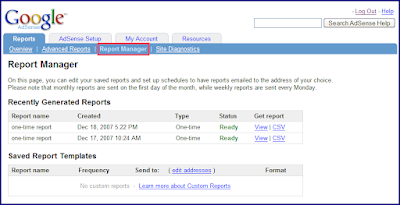
This means that while you can still wait on the Advanced Reports page for your reports to complete if you choose, you no longer need to do so -- instead, you can navigate through the other pages of your account or even log out once you've submitted the request for a report. You can then view or download your requested reports at a later time in the 'Recently Generated Reports' section of your Report Manager, located under the 'Reports' tab of your account. We're gradually adding this feature to all publisher accounts, so feel free to check for it over the next few weeks.

Your Report Manager will save up to 20 of your most recently generated reports, which will be timestamped with the date and time they were created. We hope this new option allows you more flexibility in choosing when and how you access your reports.

Monday, December 10, 2007
New Manage Ads improvements, compliments of you
We've been listening to your comments on our new ad management feature, and so we're excited to tell you about a few updates that stem directly from your requests:


It doesn't end here, though -- we've got a few more enhancements planned for the Manage Ads feature in the next few weeks, so keep checking back for more updates. In the meantime, please continue sending your suggestions our way.
- You can now view the ID number associated with a specific custom channel by visiting the 'Channels' link under the 'AdSense Setup' tab. Many of you told us that you needed these channel ID numbers for ad management programs you're using. We've added this information to your account since it no longer appears in your ad code.

- Any ad units generated within the last 7 days that haven't yet received any impressions will now be listed as 'New', rather than 'Active', in your status column. This should help avoid confusion about your newest ad units and those already appearing on your pages.
- You can now view the most recent date when each of your ad units was updated. Please note that these dates aren't retroactive, so any ad units you generated or edited before this display change will show a last-edited date of November 1st, 2007.
- We're starting to slowly roll out the manage ads feature for your referral units. Just as with AdSense for content units, you'll soon be prompted to enter names for your newly generated referral units. If you'd like to make changes to your referral units at a later time, you can visit the 'Manage Ads' page. In the 'Content' column of this page, your referral units will display 'Referrals:' followed by the products or category of products being referred.

It doesn't end here, though -- we've got a few more enhancements planned for the Manage Ads feature in the next few weeks, so keep checking back for more updates. In the meantime, please continue sending your suggestions our way.
Monday, December 3, 2007
Save your top queries
If you use AdSense for search on your pages, we'd like to let you know about an upcoming change on December 10th that will affect your top queries reports. To prepare for a few upcoming reporting enhancements, top queries data older than a year old will no longer be available. In other words, you'll only be able to view top queries reports dating back one year from the day you're generating the report.
If you have important top queries data which are older than a year old, please run any appropriate reports and save them before December 10th. You may also wish to generate a report dating from the date you started with AdSense for search to today, as data not within the one year window will be continuously removed.

If you have important top queries data which are older than a year old, please run any appropriate reports and save them before December 10th. You may also wish to generate a report dating from the date you started with AdSense for search to today, as data not within the one year window will be continuously removed.

Subscribe to:
Posts (Atom)