Showing posts with label Go Mobile Series. Show all posts

Wednesday, March 17, 2010

Go Mobile! Series: Reach local customers

About one in three mobile search queries are made by people who are looking for something in their local area. This means that local businesses have the opportunity to reach mobile users when they’re nearby and looking to take immediate action. Here are a few tips to help you reach these potential customers.

1) Control how your business appears in organic search results
Since more people search for businesses online than anywhere else, it's important to make sure your business listing can be easily found on Google.com and Google Maps. Creating a business listing in the Local Business Center helps ensure potential customers find you, and allows you to maintain full control over how your listing appears.
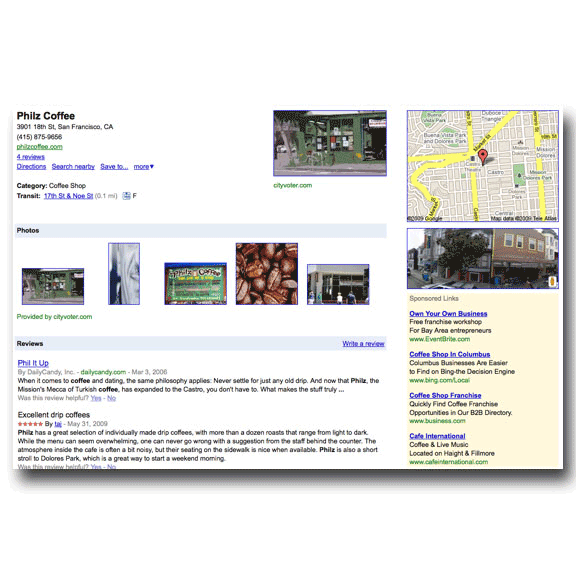

If your business already appears as a search result, you can use the Local Business Center to claim your listing and enter additional information like photos, hours of operation, website, and more.

2) Reach more potential customers near you
Whenever you create a campaign in your Google AdWords account, you can use location targeting to show your ads only to people close to your business. You can target potential customers within a given city, region or metro area. You can also define a radius around a certain point or set your own borders for more precise reach. Location targeting can help you improve the ROI on your ad campaigns by focusing on people who are nearby and therefore more likely to take action.


3) Drive local action with location extensions
A location extension is an optional additional line of ad text that shows your nearest business address to potential customers based on their location or search terms. People can click on the address to see a map of the area around your location. When the ad appears on mobile devices with full internet browsers, potential customers can also see a click-to-call phone number to connect directly with that business location by phone.


You can easily set up location extensions with the business information in your Local Business Center account or by manually entering the information in your AdWords account. While your ad will appear to users in any geographic location you chose to target, only people whose location signals indicate that they're close to one of your businesses will see your location extension.

4) Put it all together
How do geo-targeting and location extensions come together when ads appear on mobile devices? Let’s say you own a flower shop with several locations in the area. John is a potential customer who wants to pick up flowers on his way to a housewarming party. John can use his mobile phone to search for ‘flower shop.’ Since he’s close to one of your stores, your ad appears with a location extension showing the closest business address and phone number. John clicks on the business address to see a map and get driving directions. He then clicks on your phone number to call and make sure that you’re open for business and have ready-made bouquets in stock. Thanks to you, geo-targeting, and location extensions, John can quickly pick up a beautiful bouquet of lilies and make a great impression at the party!

Mobile users are often looking to take action immediately, whether it’s driving to a store or calling ahead to make sure that store has what they’re looking for. Try out these features to enable your customers to easily engage with your business.

Wednesday, March 10, 2010

Go Mobile! Series: A case study in optimizing mobile campaigns

More and more people are accessing the internet on their mobile devices. Take advantage of this trend by making sure that your ad campaigns are opted in to show on mobile devices with full internet browsers. If you’d like to take things to the next level, create separate mobile-focused campaigns so that you can optimize your keywords, ad text and landing pages for people using mobile devices.

To help you understand what mobile optimization looks like, we thought we'd share the approach that Razorfish, a global digital advertising agency, took for one of their retail clients:
  • The Razorfish team started by duplicating the existing desktop campaigns and switching the settings to target mobile devices with full internet browsers.
  • Since their client had a well-known brand name, they focused on branded keyword terms with enough traffic to help them learn quickly about what was working best for their campaigns.
  • To measure performance, they tracked several conversion metrics including whether a mobile user looked up the brick and mortar store location or downloaded a coupon from the website. Right away, they saw a 7.5% lower cost per conversion on mobile devices, encouraging them to test ways to optimize their mobile campaigns.
  • Razorfish tested whether variations in the campaign’s landing page would affect conversion rates. The team hypothesized that mobile users might be looking to take a specific action, and by starting the user’s experience closer to that action, the client would see better results. As it turned out, for this client, they saw much higher conversion rates when the user was directed to a landing page that showed nearby store locations.
  • Finally, they tested variations in the ad text. Four versions of ad text were tested, including the original copy used in desktop campaigns. Each of the three new versions provided over 9.3% lift in conversion rate over the strongest performing copy in their desktop campaigns.
We hope you can learn from Razorfish's success and apply some of these strategies to your own mobile campaigns.

To learn more about the approach Razorfish took to optimize their client’s mobile ad campaigns, or read about other case studies, check out our Mobile Ads Success Stories.


Tuesday, March 2, 2010

Go Mobile! Series: Enhanced click-to-call phone numbers

Recently, we announced new click-to-call phone numbers for local ads that appear on mobile devices with full internet browsers, like iPhone, Android or Palm Pre. This week, we're bringing the same click-to-call benefits to national advertisers through phone extensions. Phone extensions allow you to add a phone number that will be displayed whenever your ad is triggered, regardless of the user's location. Your number will appear as the last line of any ad text within existing or new campaigns. This enables customers to connect with your business by phone directly from the ad and can be especially useful if you have a call center to handle customer inquiries.


To display your national business phone number on mobile devices with full browsers, follow these two steps:

1. Set up phone extensions and add your business phone number. Customers will be able to click to call your business directly from your ad.


2. Ensure that you've chosen to show your ads on iPhones and other mobile devices with full Internet browsers in your campaign settings.


You can review how many calls you've received for each keyword, ad group, or campaign from the Campaigns page within AdWords.

On the Campaigns, Ad groups or Keywords tabs on the Campaigns page, click the 'Segment' button above the statistics table.

Select 'Click Type' to see which clicks resulted in visits to your website or phone calls.

To learn more, check out the AdWords Help Center.

Wednesday, February 24, 2010

Go Mobile! Series: Join us for a free mobile webinar

The Internet is going mobile. Every week, tens of millions of people search on Google from their mobile phones and generate hundreds of millions of searches. Using mobile ads, you can reach these consumers while they're on-the-go.

Please join us for an upcoming webinar about what we're seeing in the mobile ad space and how you can incorporate mobile advertising into your marketing strategy.

Specifically, we'll cover how you can:

* Understand mobile trends and what they mean for your business
* Drive consumer action online and in the store
* Optimize your strategy for the mobile platform

Register here for the webinar to be held on March 2, 2010 at 11:00am PST / 1:00pm CST / 2:00pm EST.

Friday, February 19, 2010

Go Mobile! Series: Targeting options to make your mobile ads relevant

Last week, we showed you how to use Google Analytics to understand how mobile visitors interact with your website. We also showed you how to use that information to optimize your AdWords campaigns. This week, we'll show you how you can tailor your campaigns to reach the most relevant mobile audience.

What mobile device are they using?
Ensure that your ad is only displayed to the right mobile audience. For example, if you sell iPhone accessories, your ad is likely not relevant to Android device owners. With advanced mobile device targeting options, you can ensure that only users with an iPhone, as seen in this example, will see your ad.


Where are they located?
With Google Analytics, you can also see where your mobile traffic is coming from. If you notice that a lot of visits are coming from a place where you have a physical business location, you may want to display your business address or phone number alongside your ads. This makes your ads more relevant. It also provides mobile customers with the ability to click to call your business from within your text ad so they can take action right away.


We hope these tips help you mobile-ize your campaigns to help you reach the right audience while they're on-the-go.

Thursday, January 28, 2010

Go Mobile! Series: Introducing click-to-call phone numbers in local ads on mobile devices

When people search for goods or services using their mobile phones, they often prefer to call a store rather than visit that store's website. Whether they're placing a direct order, making a reservation, or inquiring about services, the ability for prospective customers to easily call your business is a key distinguishing feature of searches made on mobile phones versus computers.

Now you can make it even easier for potential customers to reach you by adding a location-specific business phone number in ads that appear on mobile devices with full internet browsers. Users can click the number to call you just as easily as clicking to visit your website. And, since ads can be served based on user location, a potential customer will see -- and can click to call -- the phone number of your store location that's nearest to them, not one that's across town.

This new feature also makes it easier for you to fully measure the results of your ads by allowing you to track how many calls you actually receive.

Advertisers who participated in the beta trial have seen improved click-through rates. Plus, many advertisers received more visits to their websites in addition to incremental phone calls.

To show a click-to-call business phone number in ads on mobile devices with full Internet browsers, follow these two steps:

1. Set up location extensions and add your business phone number. Customers will be able to click to call your business location nearest to them.


2. Check that you've chosen to show your ads on iPhones and other mobile devices with full Internet browsers in your campaign settings.


That's it. Customers can now click to call you from your ads. If your campaigns are already set up this way, your phone numbers will start showing as click-to-call on mobile devices with full browsers automatically. The cost of a click to call your business will be the same as the cost of a click to visit your website.

To find out how many calls you've received from your ads, go to the Campaign Summary tab in your AdWords account. Click the "Filter and views" dropdown (step 1 in the screenshot below) and select "Segment by", then "Click Type" (steps 2, 3). The report shows how many clicks and how many calls you received (step 4). You can view calls received at the campaign, ad group or keyword level.


If your campaigns are already set up with phone numbers in location extensions and opted in to mobile devices with full browsers, but you'd prefer to opt-out out of click-to-call, simply remove the phone number from your location extensions in AdWords.

Check out how click-to-call works in our latest Mobile (Ad)itude video below, or visit the AdWords Help Center to learn more.


Wednesday, January 20, 2010

Go Mobile! Series: New targeting options for mobile ads


If you've chosen to show ads on iPhones and other mobile devices with full internet browsers, you can now target specific mobile devices or carriers.

This feature makes it easier for you to reach the right users if you have a carrier- or device-specific message. This includes landing pages that have been optimized for a specific device, billing relationships with certain carriers, or mobile apps developed for a specific platform. For example, if you sell iPhone cases, you can use device targeting to ensure that users with Android phones won't see your ads.


Starting today, we're also making sure that ads linking to mobile app downloads will automatically appear only on devices that offer those apps. Plus, the ad will display a 'Download' link instead of a URL. Simply include 'itunes.apple.com/' or 'market.android.com/' followed by the app name in the ad's visible URL, and it will automatically display as 'Download iPhone App' or 'Download Android App.'


We hope these new features will deliver a better, more relevant user experience.

Thursday, January 7, 2010

Welcome to our "Go Mobile!" Series

This is an exciting time for mobile. Over the past year, consumers have increasingly turned to their mobile devices to access the internet. They're performing searches, browsing content, watching videos, and interacting with mobile applications. Looking ahead, analysts expect internet usage on mobile devices to continue to ramp up even faster than it did on desktop computers.

Even more exciting, is our new approach to buying a mobile phone. The Nexus One is a convergence point for mobile technology, apps, and the Internet. It's a great example of how users are able to access information wherever they are, and whenever they need it -- all from a device that fits in your pocket.

For the next few months, we'll be devoting a weekly post to mobile advertising. The series will highlight insights, new features, best practices, and tips for how to optimize your mobile ad campaigns.

As you begin to think about how mobile advertising fits into your plans, we hope the Go Mobile! series will be a helpful resource to stay informed and be inspired.