Thursday, July 26, 2007

Getting your forum site to perform well with AdSense

When Amit Kumar co-founded MegaGames Forum in 1998, Google Inc. was being run from a Menlo Park garage and AdSense didn’t even exist yet. Fast-forward 9 years to 2007: Amit still runs MegaGames Forum just as a hobby, but he earns enough revenue through the AdSense program to run a dedicated server and continue growing his site.

Amit wasn't so successful with AdSense right from the start. When he first started using the program in 2005, his earnings were nothing to write home about, and it was largely because he chose his ad placement, formats, and colors at random. After recently optimizing his ads, however, Amit was able to more than double his AdSense revenue and even improve the user experience on his site. Results may vary since every site is unique, but here are some tips that any forum site, large or small, can also try out to increase revenue.


  1. The welcome box ad
    Many forums have a message above the fold on their pages welcoming users to the site and encouraging them to register. Placing a large (336x280) or medium (300x250) rectangle next to this message catches users’ attention right when they walk through the door (so to speak). By the way, these are our best performing ad units, and may also increase the number of site-targeted ads on your pages.

  2. The forum post ad

    Based on previous testing, integrating ad units into your page content can improve clickthrough rate (CTR). It also provides a better online experience, since your users see relevant ads side by side with normal content. In forums, the highest visibility content is often the first post, so it makes sense to place the ads here. Again, large and medium rectangles are your best bet!

  3. Blending colors and breaking down borders

    Colors are important for making an ad visible to the user, but they should still blend with the design of the site. Removing the borders on your ads helps even more with this concept of blending. Don’t worry -- even with a well-blended implementation, the 'Ads by Google' label keeps your users from confusing ads with content.
Bonus tip: Improve ad relevance with section targeting

With forums, the first post often contains the most relevant content on the page. By using the section targeting feature to emphasize this content, you can potentially increase CTR with better targeted ads. Visit this 'section targeting' link we mention for instructions.

If you decide to try out these tips, we’d love to hear about your success.

Decision Points and Data Models

The "Holy Grail" of BPM is to provide tools that "real" business people can use to automate their own business processes. This is really hard to do, in part because the tools are created by programmers (like me) and programmers don't generally think the same way that "real" business people do.

Most BPM tools operate on the principal that "drawing" is easier than writing. Draw the "flow" of the process using symbols (BPMN) rather than create a written description of the process. In my experience, "drawing" the process is a big win. It's fairly easy to teach anyone the symbols and how to "read" a process diagram.

Process diagrams are pretty much flow charts... Draw a symbol for all the tasks that may be performed and connect them with "arrows" that indicate the sequence of the tasks. If the sequence is not "fixed", then add "decision points" to the diagram to steer the process flow to the appropriate tasks.

Using standard BPMN notation decision points are drawn as a diamond shape as is shown in the following diagram:

After Task 1 is completed, a decision is made whether to perform Task 2A or to perform Task 2B, or to perform both of the tasks at the same time.

Here's where we have to depart from our "draw the process" approach: We have to resort to a written description of how to make the decision... something like:
  • "If the amount is greater than $50,000, then do Task 2A."
  • "If the amount is less than $50,000, then do Task 2B"
  • "If the amount is exactly $50,000, then do Task 2A and Task 2B"
Surprisingly (to a programmer) "real" business people can have a lot of problems coming up with these statements. Many seemingly simple decisions may involve a lot of variables, a lot of nuance, and a fair amount of "gut feel". Ambiguity is a reality for business people, but it drives programmers nuts.

Not surprisingly, this is the point where BPM tools begin to be difficult for "real" business people. Tools can help, but resolving ambiguity is never easy... and the process definitions must be precise.


Once the hurdle of ambiguity has been cleared, the next hurdle is to identify the specific process variables that impact the decision. Programmers who build the BPM tools are masters at this sort of thing, but it's not as easy for business people.


Programmers and business people see data differently. Programmers see data as structured arrangements of elements that can have hierarchical relationships to each other. We see types and lists and maps and transforms and a host of other constructs that allow us to efficiently sort and search and organize and store data. We separate data from it's presentation to the user... the "same" data can be displayed in many different ways.


Business people generally see data as unstructured and flat... just like a spreadsheet. Data is associated with "forms". Data is information that is written on a piece of paper (or a computer screen). There is no separation between "the form" that is filled out and the data fields on the form. If a value, perhaps a person's zip code, is needed on another form, then it is copied from one form to the other.


In a BPM tool, when the business person is asked to "write down" how a decision is made, they're usually forced to use the programmer's view of data, not their own.


For example, let's assume that a decision involves a process variable called "LoanApplication" that has a field named "Amount". In most BPM tools, the business person would be expected to "know" the data model:


Condition for executing Task2A: LoanApplication.Amount >= 50,000

Condition for executing Task2B: LoanApplication.Amount <= 50,000


This example is not too bad, since the data model is fairly flat... but what if we get a bit more complicated? Suppose the information is in a nested structure in a list. Suppose that we have multiple Applicants and each Applicant has multiple Loan Applications. Our relatively simple statements become something like the following:


Condition for executing Task2A: ApplicantList[i].LoanApplication[j].Amount >= 50,000

Condition for executing Task2B: ApplicantList[i].LoanApplication[j].Amount <= 50,000


I've had business clients go into brain-lock when I show them something like this... I know that's hard for those of you out there with programming backgrounds to believe this, but it's a very common reaction.


What's generally missing from Process Design tools is a "conversational" method for discovering what the process variables are. Many processes involve a large amount of data, but in most instances the flow of the process is determined by a very small subset of the data. It's a needle in a haystack problem... Out of that mound of information, what really effects the flow of the process?


When a business person is drawing a process and comes to a decision point, they have a general idea what "variables"are necessary to make the decision.

What's needed is a "map" between the business person's view of the variable, and the programmer's implementation of the variable.


The trick is to take the business person's general knowledge about the process variables and work backwards to find out where each "variable" actually originates. In which steps of the process could a variable be created? In which steps of the process could that variable be changed? If you can work back and figure out "where" in the process a specific variable came from, then you have a much better chance of presenting the variable to a business person in a recognizable manner.

Customer reactions to the latest Google Earth Enterprise


We launched the latest version of Google Earth Enterprise today, with a number of new features, including the ability to display enterprise search results (from say, the Google Search Appliance) on the globe inside Google Earth. You can read all about it on the Google geo blog.

We're very excited to enable customers to easily publish Google Earth Enterprise datasets in a browser, so that employees across the organization can leverage the power of Google Earth. I thought I'd share a little about what our customers are saying:
  • Dell is pleased to take advantage of the new features of Google Earth Enterprise for both marketing and customer support. By visualizing global website traffic at www.dell.com in Google Earth, we are building a stronger sense of community with our internal and external partners through awareness and better visibility around traffic trends and patterns. In addition, our global Enterprise Command Center gains a global view of customer activity at a glance, ensuring optimum responsiveness for customers with Enterprise Silver, Gold and Platinum Plus support. Google Earth gives us the intuitive yet powerful interface to critical business information that we need to manage effectively in today's fast paced business environment.
- Jamie Wills, vice president of sales and marketing systems, Dell
  • Norsk Hydro welcomes Google Earth Enterprise as an innovative tool for our global exploration efforts. With Google Earth's intuitive 3D geo-browsing experience, researchers can visualize data more effectively, allowing us to explore areas of interest more efficiently than ever. Deployed in our Research Centre in Bergen, Norway, the Google Earth Enterprise system is used to synthesize large quantities of global data including high resolution imagery and terrain models and dozens of vector layers that are relevant to Hydro's interests. It's an eye opening experience to see years of accumulated geological and geophysical data appear with just a few clicks.
- Ole Martinsen, Head of Exploration Research, Norsk Hydro
  • Google Earth Enterprise enhances our ability to identify, track and update critical infrastructure throughout Alabama. Our Virtual Alabama information sharing database is anchored by Google Earth Enterprise. The incorporation of Google Earth Enterprise into the Virtual Alabama model will dramatically improve the speed and accessibility of Virtual Alabama to our user population.
- Jim Walker, Homeland Security Director, State of Alabama

We'd love to hear how Google Earth Enterprise is helping your business benefit from geographic information, so please let us know.

Wednesday, July 25, 2007

what is an adams apple? kids info


You're at the high school baseball game with your friends, and you see your big brother's friend Justin in the dugout drinking from a water bottle. With every sip he takes, a big bump moves up and down on the front of his neck.

The boys your age don't have bumps like that, you think to yourself. And come to think of it, neither do any of the girls you know, no matter how old they are. What's going on here?

When kids hit puberty, their bodies and minds go through tons of changes. One change that every kid can count on is lots of body parts growing and changing shape. Almost every part gets in on the growing action, including the larynx (say: lar-inks).

Another name for the larynx is the voice box, and it's in the throat. The larynx is what gives you your voice, whether you're talking, laughing, whispering, singing, or screaming! You can find your larynx by touching the front of your throat and humming. When you feel vibrations under your fingers, you've found it!

When the larynx grows larger during puberty, it sticks out at the front of the throat. This is what's called an Adam's apple. Everyone's larynx grows during puberty, but a girl's larynx doesn't grow as much as a boy's does. That's why boys have Adam's apples. Most girls don't have Adam's apples, but some do. It's no big deal either way.

But why is it called an Adam's apple? If you think it's called that after the story of the Garden of Eden where Adam ate a piece of the forbidden fruit that got stuck in his throat, you're right. An Adam's apple sometimes looks like a small, rounded apple just under the skin in the front of the throat.

This larger larynx also gives boys deeper voices. Actually, girls' voices get a little bit deeper as their larynxes get larger, too. But because boys' larynxes grow so much more, it makes their voices deeper than girls' voices.

The larynx doesn't grow to its new size overnight, though. If you've ever heard a teenage boy's voice sound squeaky, you've heard a larynx trying to get adjusted to its new size!

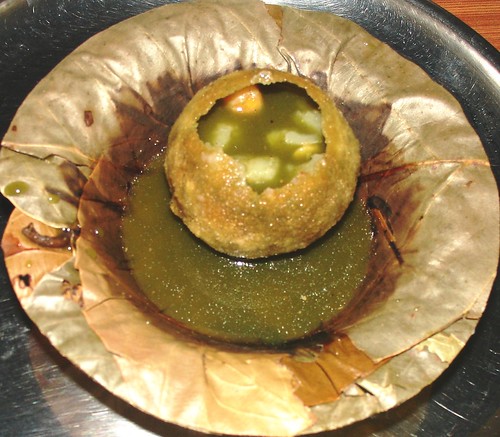
pani puri recipe - I love it!


this is my favourite road side delight... easy to prepare at home but i prefer it out on the road, in a group, with either friends or relatives.its everywhere around the corner of India and two most famous places are mumbai and Calcutta.its not eaten to satisfy our pangs of hunger but does give satisfaction when you crave for mouth watering savoury stuffs... its spicy,tangy and stingy taste refreshes best and you wont find any alternative... trust me.when your minds craves it, you must have it! so do i find any other soul who matches my mind??

'Pani puri'also commonly called 'Gol gappas' by Indians can be bought from Indian supermarkets or chaat shops in bags ready to be filled. If pani puri masala is not available, mix 1/4 tsp chilli powderr, 1 tsp cumin powder, 1 tsp kala namak, 1 tbsp tamarind pulp & a pinch of salt.

Pani puri recipe Ingredients

250g Pani Puri or gol gappa
125g black chickpeas
100g steamed bean sprouts (lentils should just begin to sprout) - optional
125g potatoes, boiled and coarsely mashed
1 bunch of mint leaves
1/2 bunch of coriander leaves
salt to taste
1/4 tsp chilli powder
6 tbsp pani poori masala
mint chutney
tamarind chutney


Method

Grind the mint and coriander leaves into a paste.
Mix pani puri masala in 2 litres of cold water. Add mint and coriander paste and the ice cubes.

Wash chick peas and soak overnight. Next day, boil in a pan or pressure cook with water and salt, until soft. Drain and keep aside.

Add salt, chilli powder to the potatoes and mix in the chick peas and the bean sprouts, if using. Make a hole on one side in each gol gappa, and fill it with a teaspoon of the potato mixture.

Top with a little mint and tamarind chutney. To eat, dip each gol gappa into the prepared water and eat.