Recently, we caught up with Jason Calacanis from Weblogs, Inc. who shared with us how he's taken his AdSense earnings to a new level. We really enjoyed speaking with Jason, and knowing how much you enjoy hearing from your fellow publishers, we're featuring him as our newest case study. Check it out and find out how he went from making a few hundred dollars a day to $3,000 a day with AdSense.
Jason is enjoying success on other fronts these days - Weblogs, Inc. was just acquired by AOL last week. Our congratulations to the team.
Thursday, October 13, 2005
Tuesday, October 11, 2005
Target with even more precision
As we've mentioned, site targeting allows you to hand pick sites from our content network where you'd like to show your ads. Now, we're taking it to the next level. Last week, we introduced site sections, a feature that allows you to target a specific section or page of a site.
So, why are site sections useful? Many sites contain diverse content including only a limited number of pages that are relevant to your business interests. With site sections, you can choose to show your ads only on those pages. For example, imagine that an advertiser is selling soccer cleats and would like to target the site www.SportsExample.com, which contains a large volume of information about different sports. However, this advertiser doesn't want her ads for soccer cleats to show up next to articles about ice hockey or football. Instead of showing her ads across the entire 'SportsExample.com' site, she can limit them to 'SportsExample.com/soccer', the section of the site that contains relevant content.
If this sounds like something you'd like to try, you can add a site section when creating a new site-targeted campaign, or by clicking on the 'Edit Sites and CPMs' link in your existing site targeted campaign. Once you've added your site section and clicked 'Save,' your ads will be eligible to start showing on the pages that you listed.
So, why are site sections useful? Many sites contain diverse content including only a limited number of pages that are relevant to your business interests. With site sections, you can choose to show your ads only on those pages. For example, imagine that an advertiser is selling soccer cleats and would like to target the site www.SportsExample.com, which contains a large volume of information about different sports. However, this advertiser doesn't want her ads for soccer cleats to show up next to articles about ice hockey or football. Instead of showing her ads across the entire 'SportsExample.com' site, she can limit them to 'SportsExample.com/soccer', the section of the site that contains relevant content.
If this sounds like something you'd like to try, you can add a site section when creating a new site-targeted campaign, or by clicking on the 'Edit Sites and CPMs' link in your existing site targeted campaign. Once you've added your site section and clicked 'Save,' your ads will be eligible to start showing on the pages that you listed.
Monday, October 10, 2005
Searching for flexibility
We often hear the following question - "In AdSense for search, how can I change the default search from Google to my own site?"
Many of you already know that you can add up to three sites alongside the google.com search when generating your AdSense for search code. Now that you have added your own site(s), you also have the flexibility to select one of these to be the default search.

The simple key is to select your site in the example box on the "Search code" page on the AdSense for search tab, so that the selected radio button is next to the site you would like to appear as default. Then the code will automatically reflect your selection.
Many of you already know that you can add up to three sites alongside the google.com search when generating your AdSense for search code. Now that you have added your own site(s), you also have the flexibility to select one of these to be the default search.
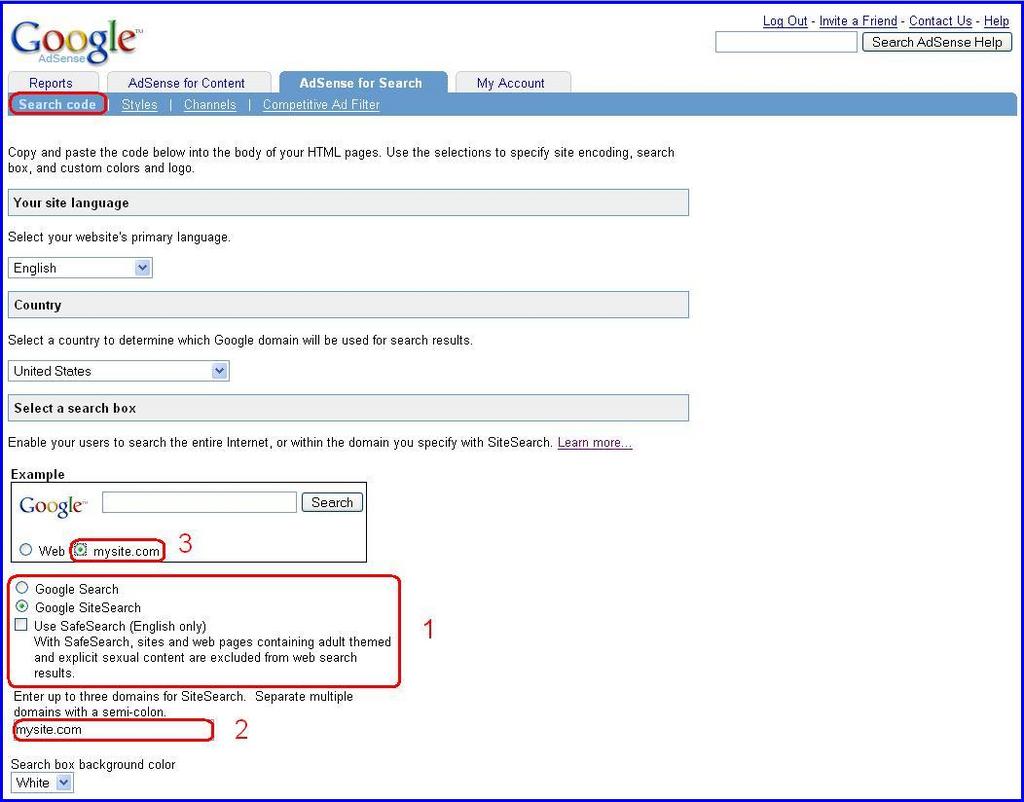
The simple key is to select your site in the example box on the "Search code" page on the AdSense for search tab, so that the selected radio button is next to the site you would like to appear as default. Then the code will automatically reflect your selection.
Friday, October 7, 2005
Six AdSense optimization tips for forums
1. Format is important for multiple ad units
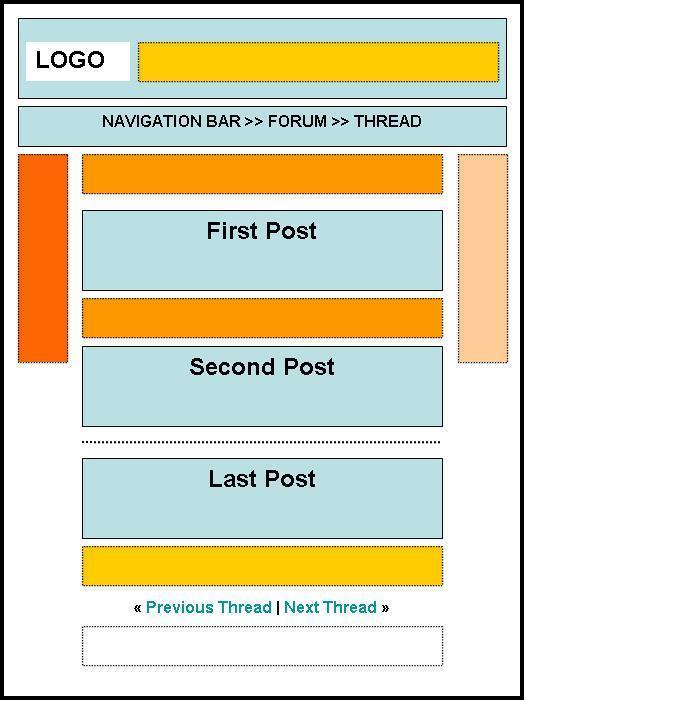
Placing a skyscraper above the fold on the left side of your forum seems to produce slightly better performance than other positioning. However, when using multiple ad units throughout the page our horizontal bias still favors the leaderboard. See the Forum Heat Map below for more details.

2. Display your ad units where repeat users will notice them
A leaderboard at the very top fits nicely next to the logo, but forum regulars tend to skip the header and go straight to the meat of the thread. Placing your ad unit above or below the first post can be more effective.
3. Place a leaderboard immediately after the last post
This provides users who make it to the end of a thread with a ‘next step’ when the content ends. If you place it after the footer, though, folks will move to the next thread before they even see the ad!
4. Use horizontal link units
Link units offer a wider range of relevant topics for users to browse. A horizontal unit can be placed near the top of your forum just below the header.
5. Opt-in to image ads
Supporting image ads increases the pool of ads –particularly cost-per-thousand-impression (CPM) ads – bidding to display on your site. Since forums tend to have lower click-through rates (CTRs) than other types of sites, CPM ads can improve revenue without the need for clicks. Please remember, however, that CPM ads come in both text and image formats.
6. Be sensitive to your forum community
Forums are highly interactive, so be sensitive to your users when implementing your AdSense ads. Be sure to blend the ads nicely, so they don’t appear overly intrusive – but don’t blend them so well they mislead your users! Every forum site is different and you know your community best, so as always use your own judgment to create the most positive experience for your users.
Placing a skyscraper above the fold on the left side of your forum seems to produce slightly better performance than other positioning. However, when using multiple ad units throughout the page our horizontal bias still favors the leaderboard. See the Forum Heat Map below for more details.
2. Display your ad units where repeat users will notice them
A leaderboard at the very top fits nicely next to the logo, but forum regulars tend to skip the header and go straight to the meat of the thread. Placing your ad unit above or below the first post can be more effective.
3. Place a leaderboard immediately after the last post
This provides users who make it to the end of a thread with a ‘next step’ when the content ends. If you place it after the footer, though, folks will move to the next thread before they even see the ad!
4. Use horizontal link units
Link units offer a wider range of relevant topics for users to browse. A horizontal unit can be placed near the top of your forum just below the header.
5. Opt-in to image ads
Supporting image ads increases the pool of ads –particularly cost-per-thousand-impression (CPM) ads – bidding to display on your site. Since forums tend to have lower click-through rates (CTRs) than other types of sites, CPM ads can improve revenue without the need for clicks. Please remember, however, that CPM ads come in both text and image formats.
6. Be sensitive to your forum community
Forums are highly interactive, so be sensitive to your users when implementing your AdSense ads. Be sure to blend the ads nicely, so they don’t appear overly intrusive – but don’t blend them so well they mislead your users! Every forum site is different and you know your community best, so as always use your own judgment to create the most positive experience for your users.
Setting (y)our Q4 goals
In case you’re wondering why we’ve been a bit quiet in the first half of this week, our team was taking some time to sit down and review our blog statistics and set new goals for this quarter. In the graph below, we’ve plotted out the number of Inside AdWords readers since we launched in May. As you can see, the graph is a nice “up and to the right”, as they say, but we’re still a bit short of our goal of having lots of Inside AdWords readers (see the shaded yellow region for more information). We’d like to take this opportunity to remind you that even if you don’t want to come visit the blog everyday, you can still take advantage of our site feed, or our posts-by-email in order to keep up with all the AdWords tips and updates we have to offer.
As we approach the busy holiday season, be sure to take a step back and think about your own goals as well. Whether you want to promote sales of your seasonal merchandise or to continue your trend of “up and to the right” performance, we hope that AdWords can help you attain your goals—in Q4 and beyond.

[Figure 1. Graph of Inside AdWords readership (October 2005)]
As we approach the busy holiday season, be sure to take a step back and think about your own goals as well. Whether you want to promote sales of your seasonal merchandise or to continue your trend of “up and to the right” performance, we hope that AdWords can help you attain your goals—in Q4 and beyond.
Subscribe to:
Posts (Atom)